Movie artwork: Difference between revisions
m Updated for v20 |
mNo edit summary |
||
| Line 45: | Line 45: | ||
<gallery mode="packed" widths="1000px" heights="562px"> | <gallery mode="packed" widths="1000px" heights="562px"> | ||
File:LocalMovieArtwork01.jpg|link=|'''''Example of correct use of Movie Folder with artwork, nfo file, trailer and theme.<br> Take | File:LocalMovieArtwork01.jpg|link=|'''''Example of correct use of Movie Folder with artwork, nfo file, trailer and theme.<br> Take note of file naming and location.''''' | ||
</gallery> | </gallery> | ||
Latest revision as of 08:24, 25 July 2023
| Artwork contents |
|---|
See also: Return to: |

|
 Video Library Video Library |
Artwork |
Movie artwork
|
Introduction
This page details information specific to the movie library.
The following artwork types are standard for movies and supported by many skins. For more details see Artwork Types
| Commonly Supported Artwork | |||||||||
|---|---|---|---|---|---|---|---|---|---|
| banner | clearart | clearlogo | discart | fanart | fanartx (extra fanart) |
keyart | landscape | poster | posterx (extra poster) |
Scraping
The Kodi scrapers can automatically download artwork without any extra effort from the user.
Artwork settings for the video library are adjusted in the Kodi settings pages here... Settings > Media > Videos > Artwork
Local Artwork
Local movie artwork is saved in the same folder where the movie file is saved.
The default file name for movie artwork is <movie file name>-<arttype>.<ext> - see image below. (does not apply to DVD and Bluray folders)
There is also a short name <arttype>.<ext> that is used for DVD and Bluray folders. It can also be used for Single Files when the following conditions are met...
- Movie Folders are used
- Movies are in separate folders that match the movie title must be Enabled in the Set Content Screen
- No corresponding artwork with long format names are present in that movie folder, as these take priority.
-
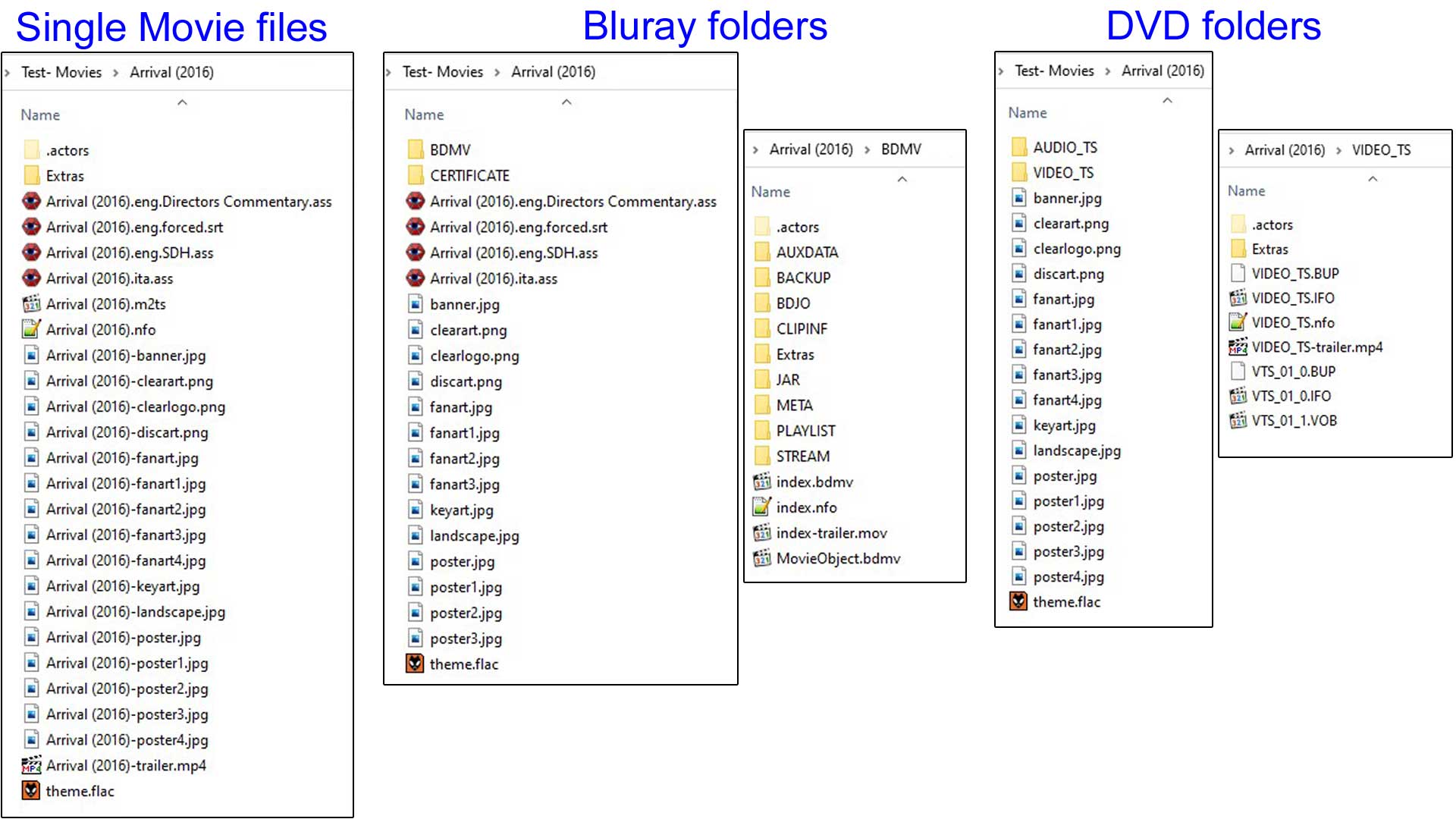 Example of correct use of Movie Folder with artwork, nfo file, trailer and theme.
Take note of file naming and location.
| Return to top |
|---|