Movie artwork: Difference between revisions
mNo edit summary |
|||
| (59 intermediate revisions by 3 users not shown) | |||
| Line 1: | Line 1: | ||
{{Artwork_Contents}} | {{Artwork_Contents}} | ||
{{mininav|[[Artwork]]}} | {{mininav|[[Video_library|Video Library]] |[[Artwork]]}} | ||
= Introduction = | |||
<section begin="intro" />This page details information specific to the movie library.<section end="intro" /> | |||
The following artwork types are standard for movies and supported by many skins. For more details see '''[[Artwork types|Artwork Types]]''' | |||
{| class="prettytable" | |||
|- | |||
! colspan="10" style="text-align:left;" | Commonly Supported Artwork | |||
|- | |||
|style="width:80px; text-align:left;"|banner | |||
|style="width:80px; text-align:left;"|clearart | |||
|style="width:80px; text-align:left;"|clearlogo | |||
|style="width:80px; text-align:left;"|discart | |||
|style="width:80px; text-align:left;"|fanart | |||
|style="width:100px; text-align:left;"|fanart''x''<br> (extra fanart) | |||
|style="width:80px; text-align:left;"|keyart | |||
|style="width:80px; text-align:left;"|landscape | |||
|style="width:80px; text-align:left;"|poster | |||
|style="width:100px; text-align:left;"|poster''x''<br> (extra poster) | |||
|} | |||
= | = Scraping = | ||
The {{kodi}} scrapers can automatically download artwork without any extra effort from the user. | |||
Artwork settings for the video library are adjusted in the {{kodi}} settings pages here... {{highlight|[[Settings/Media/Videos#Artwork|Settings > Media > Videos > Artwork]]}} | |||
= Local Artwork = | |||
Local movie artwork is saved in the same folder where the '''[[Naming_video_files|movie file]]''' is saved. | |||
The default file name for movie artwork is '''<movie file name>-<arttype>.<ext>''' - see image below. {{resize|0.8em|(does not apply to DVD and Bluray folders)}} | |||
There is also a short name '''<arttype>.<ext>''' that is used for DVD and Bluray folders. It can also be used for Single Files when the following conditions are met... | |||
#'''[[Naming_video_files/Movies#Movie_Folder|Movie Folders]]''' are used | |||
#'''Movies are in separate folders that match the movie title''' must be '''Enabled''' in the [[Adding_video_sources#Set_Content|Set Content Screen]] | |||
#No corresponding artwork with long format names are present in that movie folder, as these take priority. | |||
== | <gallery mode="packed" widths="1000px" heights="562px"> | ||
File:LocalMovieArtwork01.jpg|link=|'''''Example of correct use of Movie Folder with artwork, nfo file, trailer and theme.<br> Take note of file naming and location.''''' | |||
</gallery> | |||
{{top}} | |||
{{updated|20}} | |||
[[Category:Karellen]] | |||
[[Category: | |||
[[Category:Video library]] | [[Category:Video library]] | ||
Latest revision as of 08:24, 25 July 2023
| Artwork contents |
|---|
See also: Return to: |

|
 Video Library Video Library |
Artwork |
Movie artwork
|
Introduction
This page details information specific to the movie library.
The following artwork types are standard for movies and supported by many skins. For more details see Artwork Types
| Commonly Supported Artwork | |||||||||
|---|---|---|---|---|---|---|---|---|---|
| banner | clearart | clearlogo | discart | fanart | fanartx (extra fanart) |
keyart | landscape | poster | posterx (extra poster) |
Scraping
The Kodi scrapers can automatically download artwork without any extra effort from the user.
Artwork settings for the video library are adjusted in the Kodi settings pages here... Settings > Media > Videos > Artwork
Local Artwork
Local movie artwork is saved in the same folder where the movie file is saved.
The default file name for movie artwork is <movie file name>-<arttype>.<ext> - see image below. (does not apply to DVD and Bluray folders)
There is also a short name <arttype>.<ext> that is used for DVD and Bluray folders. It can also be used for Single Files when the following conditions are met...
- Movie Folders are used
- Movies are in separate folders that match the movie title must be Enabled in the Set Content Screen
- No corresponding artwork with long format names are present in that movie folder, as these take priority.
-
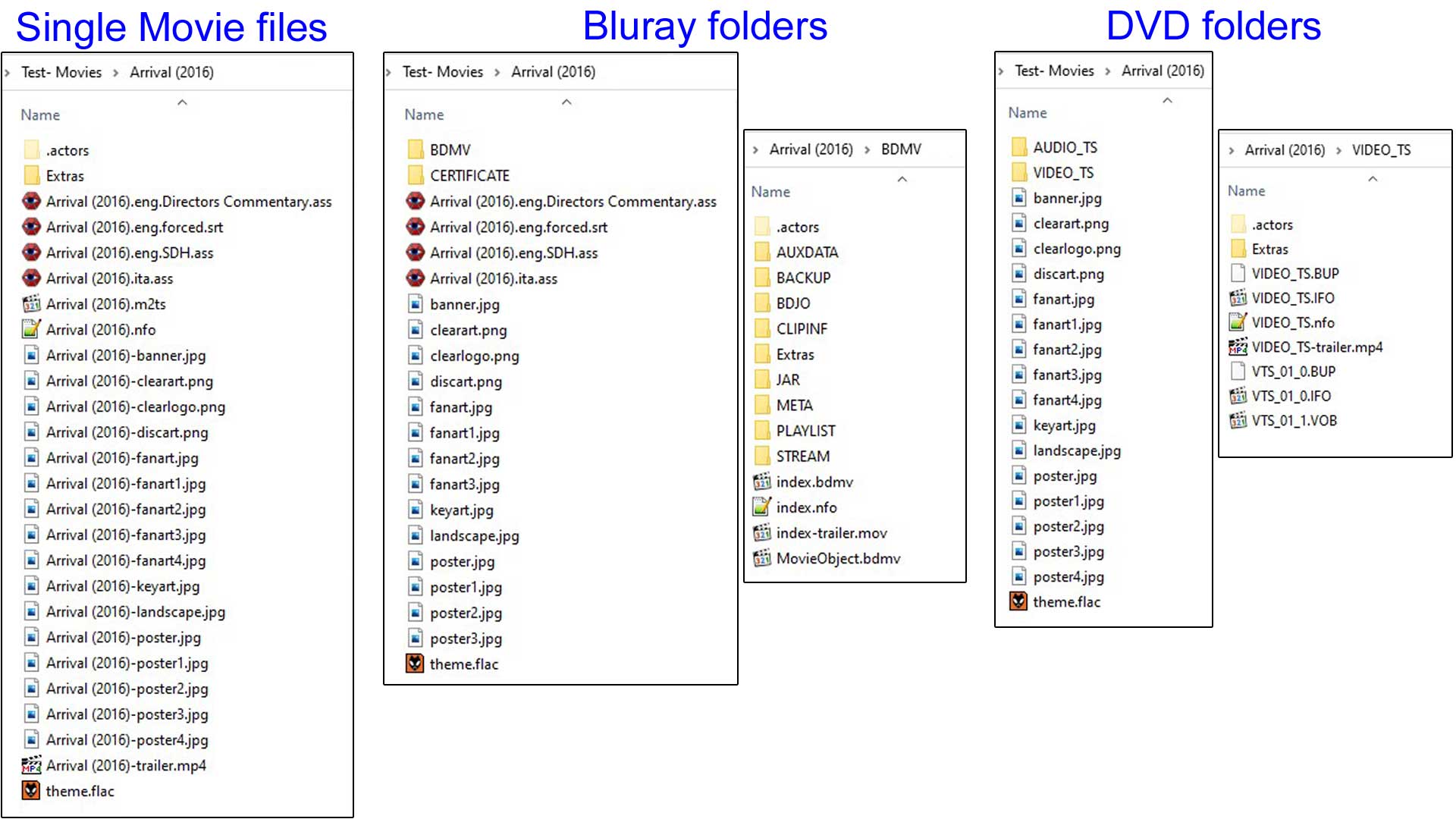 Example of correct use of Movie Folder with artwork, nfo file, trailer and theme.
Take note of file naming and location.
| Return to top |
|---|