Naming video files/Seasons: Difference between revisions
Jump to navigation
Jump to search
Created page with "{{VideoLibraryCreate}} {{mininav| Video library |Create Video Library }} = Season Folders = {| ! scope="row" colspan="10" style="width:..." |
No edit summary |
||
| Line 13: | Line 13: | ||
* Season folders are optional. They are useful to reduce clutter in the main TV Show folder. | * Season folders are optional. They are useful to reduce clutter in the main TV Show folder. | ||
* If you use Season folders, the name of the season folder can be anything you prefer as the season folder plays no part in the scraping process. | * If you use Season folders, the name of the season folder can be anything you prefer as the season folder plays no part in the scraping process. | ||
* | * For some shows TVDB uses the '''Year''' as the season number ''(see images below)''. This is quite common with older shows, daytime soaps and talk shows. | ||
* As a side note, once your TV Shows have been scanned into the Library, it is possible to rename the Season folder displayed by {{kodi}}. '''''See: [[Season_rename|Season Rename]]''''' | * As a side note, once your TV Shows have been scanned into the Library, it is possible to rename the Season folder displayed by {{kodi}}. '''''See: [[Season_rename|Season Rename]]''''' | ||
|- | |- | ||
Revision as of 07:47, 13 May 2021
| Create Video Libraries |
| 1. The Basics |
| 2. Source Folder |
| 3. Movie Setup |
| 4a. TV Show Setup |
| 4b. Seasons Setup |
| 4c. Episodes Setup |
| 5. Music Videos Setup |
| 6. Add Source & Scrape |
| 7. Scraping Problems |

|
 Video library Video library |
Create Video Library |
Seasons
|
Season Folders
 |
| |||||||||
-
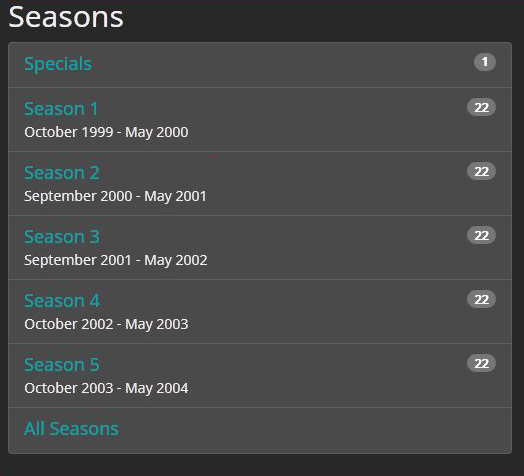 Image 1- Standard Season Numbers
 -
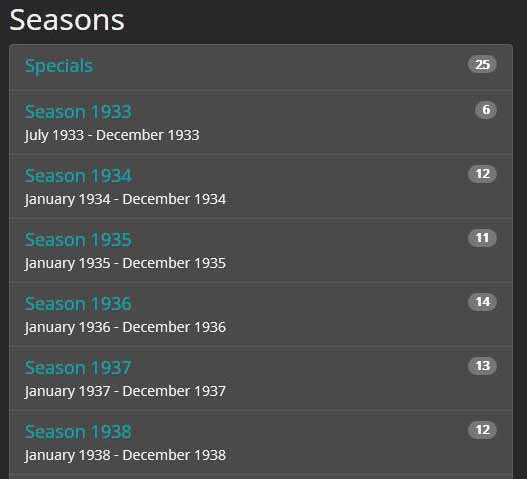 Image 2- Year as Season Number


|
Previous step | Next step | 
|
| TV Show Setup | Episodes Setup |
| Return to top |
|---|