NFO files/Movie sets: Difference between revisions
First creation |
mNo edit summary |
||
| Line 31: | Line 31: | ||
<syntaxhighlight lang="xml"> | <syntaxhighlight lang="xml"> | ||
<?xml version="1.0" encoding="UTF-8" standalone="yes" ?> | |||
<set> | <set> | ||
<title>New Title</title> | <title>New Title</title> | ||
Latest revision as of 20:43, 4 August 2025
| NFO Contents |
|---|
|
See also: Return to: |

|
 NFO files NFO files |
Movie sets
|
Introduction
The set.nfo was introduced in v22 Piers to allow users to easily edit movie set (aka movie collection) information.[1]
This file is a unique nfo file specifically for movie sets. It should be considered an override nfo file. It is not a full metadata nfo file and Kodi will only read it in specific situations.
General information on movie sets can be found here... Movie Sets
Name and Location
The nfo file is named set.nfo
The nfo file is saved in the appropriate movie-set sub-folder of the Movie Set Information Folder (MSIF)
-
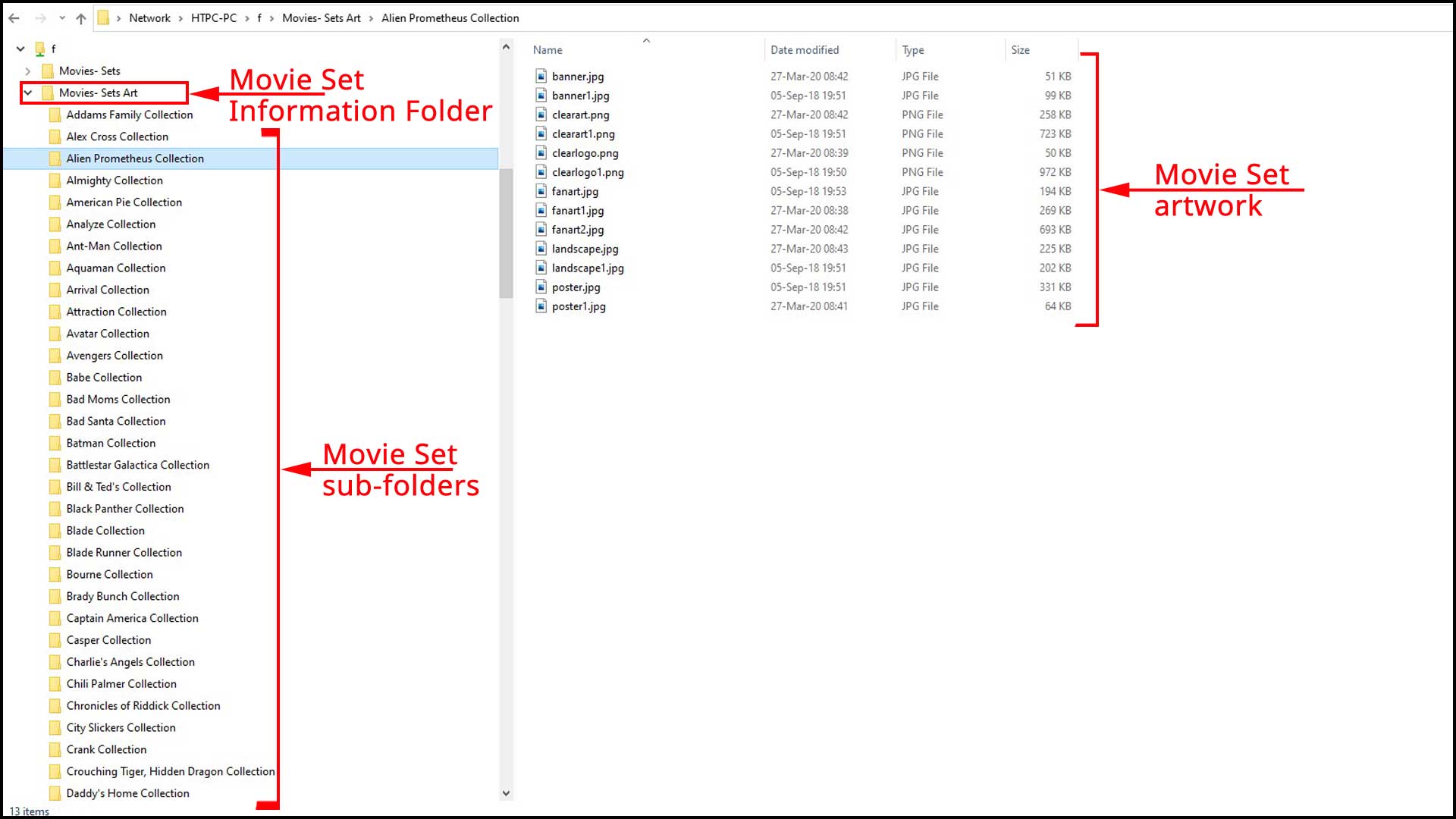 The structure of the MSIF

Contents
The format of the nfo file is detailed below.
The set nfo file does not introduce any new metadata fields for the movie-set. The following are the only tags accepted in the set.nfo file.
<?xml version="1.0" encoding="UTF-8" standalone="yes" ?>
<set>
    <title>New Title</title>
    <originaltitle>Original Title</originaltitle>
    <overview>New description</overview>
</set>
Usage
The Refresh button can be used to edit the title and overview of the movie-set after scanning or scraping of the movies.
The Refresh button will also update new artwork added to the set folder.
- Add the set.nfo file to the movie-set subfolder as described above.
- Navigate to the movie-set in the Sets node
- Call up the Information page by:
- Press i on a remote control
- Press i on a keyboard
- Using the Context Menu, select Information
- Select Refresh
-
 Using the Refresh button

When additional movies from that movie-set are scraped into the library, they will also inherit the modified set metadata as long as the set.nfo remains in place.
Notes
Some general information to be aware of:
- After running an Export to separate files, the nfo files for those movies will still contain the original set metadata from the scraping process. Keeping the set.nfo in place will ensure the set data is updated in the Kodi library when rebuilding your library.
- If you would like to combine movie-sets, eg combine the Alien Collection, Alien:Romulus Collection and The Prometheus Collection, then this should be done using the Movie Set Editor
- The scanning hierarchy, in increasing order of priority, is as follows:
- if no movie.nfo is found then the scraper results will be used
- if there is a movie.nfo in the folder of any of the movies in the set then the <overview> tag in the <set> tag is used.
- if a set.nfo is found in the MSIF then that takes priorty over both the above.
References
| Return to top |
|---|