NFO files/Movies: Difference between revisions
>Martijn Created page with "====Movies==== movie.nfo will override all and any .nfo files in the same folder as the media files if you use the "Use foldernames for lookups" setting. If you don't, then movie..." |
default values |
||
| (65 intermediate revisions by 13 users not shown) | |||
| Line 1: | Line 1: | ||
{{NFO_content}} | |||
{{mininav|[[NFO files]]}} | |||
__TOC__ | |||
< | |||
= Introduction = | |||
NFO files to be scraped into the movie library are relatively simple and require only a single nfo file per title. | |||
= nfo Name and Location = | |||
'''{{resize|1.2em|Regardless of what settings you have set for the source and scraper, {{Kodi}} will always search for and scan the nfo file first where available.}}''' | |||
There are two naming schemes for movie nfo files. Both are explained and {{kodi}} recommends using the ''<VideoFileName>.nfo'' format. | |||
<section begin="MovieNFONaming" />;<VideoFileName>.nfo | |||
:*NFO Files are named the same as the video file except with the ''.nfo'' extension. | |||
:*We recommend using this filename format to name nfo files. | |||
;movie.nfo | |||
:{{Kodi}} may also scan nfo files named '''''movie.nfo'''''. To use this name, the setting '''Movies are in separate folders that match the movie title''' must be '''Enabled''' in the '''[[Adding_video_sources#Set_Content|Set Content Screen]]''' | |||
:*If the above setting is not enabled, {{kodi}} will ignore the ''movie.nfo''. If the ''<VideoFileName>.nfo'' file is available, {{kodi}} will scan this one instead, otherwise an online scrape will be performed if a valid scraper is set for the Source. | |||
:*If you use ''movie.nfo'' and later Export your library to Separate Files, {{kodi}} will still create the nfo file in the ''<VideoFileName>.nfo'' format and two nfo files will exist. If a Refresh or rescan is run in future, and the above setting is still enabled, the ''<VideoFileName>.nfo'' file will be ignored in favour of ''movie.nfo'', which means any changes you may have made to the library entry (play counts, watched status etc) will not be re-scanned back into the library. | |||
:*We recommend using the ''<VideoFileName>.nfo'' format for nfo files to avoid the above traps.<section end="MovieNFONaming" /> | |||
The below image details naming and location for Single File, DVD and Bluray movies: | |||
<gallery mode="packed" widths="1000px" heights="562px"> | |||
File:LocalMovieArtwork01.jpg|'''''Example of correct use of Movie Folder with artwork, nfo file, trailer and theme.<br> Take note of file naming and location.''''' | |||
</gallery> | |||
= nfo Tags = | |||
The following table lists available XML tags. <ref>https://github.com/xbmc/xbmc/blob/master/xbmc/video/VideoInfoTag.cpp</ref> | |||
The "Required" column indicates whether a tag can be optionally added or ommitted when creating the nfo to suit your purpose. The less tags used, the less information added to the library. | |||
{|class="prettytable" | |||
! width=430px | NFO (xml) Tag || Required || Multiple || Notes | |||
|- | |||
|<movie></movie> || {{Yes}} || No || The top level parent tag for the nfo file. All other tags must be contained within these two tags | |||
|- | |||
|<title></title> || {{Yes}} || No || The title for the movie | |||
|- | |||
|<originaltitle></originaltitle> || No || No || Displays the original title of the movie. <br> | |||
For example, if the scraper is set to german language and the scraped movie in german is "Der mit dem Wolf tanzt" the original title will be "Dances with Wolves" | |||
|- | |||
|<sorttitle></sorttitle> || No || No || Allows alternate title sort without modifying movie title. Not displayed in any library listing. See: ''[[Movie_sets#Sort_Title|Sort Title]]'' | |||
|- | |||
| | |||
<ratings> | |||
<rating name="" max="10" default=""> | |||
<value></value> | |||
<votes></votes> | |||
</rating> | |||
</ratings> | |||
|| No || No || ''default="true"'' ''default="false"''<br> | |||
::Only one rating can be set as ''default="true"'', additional ratings must be set as ''default="false"'' or omit the default attribute<br> | |||
''name="identifier"''. Do not use "default". Examples of identifier include...<br> | |||
::''<rating name="imdb" max="10">''<br> | |||
::''<rating name="trakt" max="10">''<br> | |||
::''<rating name="themoviedb" max="10">''<br> | |||
::''<rating name="metacritic" max="10">''<br> | |||
::''<rating name="tomatometerallcritics" max="10">''<br> | |||
::''<rating name="tomatometerallaudience" max="10">''<br> | |||
Example of complete entry... | |||
::''<rating name="themoviedb" max="10" default="true">''<br> | |||
::''<rating name="imdb" max="10" default="false"> or <rating name="themoviedb" max="10">''<br> | |||
</ | |- | ||
|<userrating></userrating> || No || No || Personal rating set by the user | |||
|- | |||
|<top250></top250> || No || No || Ranking in IMDB Top 250 movies | |||
|- | |||
|<outline></outline> || || || Should be short, will be displayed on a single line (scraped from IMDB only) | |||
|- | |||
|<plot></plot> || || || Can contain more information on multiple lines, will be wrapped | |||
|- | |||
|<tagline></tagline> || No || No || Short movie slogan. "The true story of a real fake" is the tagline for "Catch me if you can" | |||
|- | |||
|<runtime></runtime> || No || No || Minutes only. If ommitted, {{kodi}} will add runtime upon scanning | |||
|- | |||
|<thumb aspect="" preview=""></thumb> || No || Yes || Path to available Movie Posters. Not needed when using local artwork<br> | |||
Example use of ''aspect=""'' | |||
:<thumb aspect="banner" | |||
:<thumb aspect="clearart" | |||
:<thumb aspect="clearlogo" | |||
:<thumb aspect="discart" | |||
:<thumb aspect="keyart" | |||
:<thumb aspect="landscape" | |||
:<thumb aspect="poster" | |||
|- | |||
| | |||
<fanart> | |||
<thumb preview=""></thumb> | |||
</fanart> | |||
|| No || Yes^ || Path to available movie fanart.<br> | |||
:^ Multiple <thumb> entries allowed between the <fanart></fanart> tags | |||
|- | |||
|<mpaa></mpaa> || No || No || Country specific mpaa rating system. Check with skin author which prefix is required to diplay your country certification flags | |||
|- | |||
|<playcount></playcount> || No || No || Number of times movie has been played.<br>See... [[Import-export_library/Video#Watched.2C_PlayCount.2C_ResumePoints|Import-Export]] | |||
|- | |||
|<lastplayed></lastplayed> || No || No || Date last played as ''yyyy-mm-dd'' | |||
|- | |||
|<id></id> || No || No || The default ID. <br> | |||
Do not use. This is a Kodi generated tag. See next item. | |||
|- | |||
|<uniqueid type="" default=""></uniqueid> || {{Yes}} || Yes ||The ID from the scraper site.<br> | |||
''type=""'' Identifier of the ID. Do not use "default". Examples of identifier include...<br> | |||
::''<uniqueid type="imdb"''<br> | |||
::''<uniqueid type="tvdb"''<br> | |||
::''<uniqueid type="tmdb"''<br> | |||
::For non-scraped items, use simple values like ''"home", "sport", "doco"'' etc<br> | |||
::The value can be alpha-numeric eg ''tt3480556'' for imdb, ''286668'' for tmdb, ''home001'' for home movies, etc<br> | |||
''default="true"'' ''default="false"''<br> | |||
::Only one uniqueID can be set as ''default="true"'', additional uniqueID's must be set as ''default="false"'' or ommit the default attribute<br> | |||
Example of complete entry... | |||
::''<uniqueid type="tmdb" default="true">''<br> | |||
::''<uniqueid type="imdb" default="false"> or <uniqueid type="imdb">''<br> | |||
|- | |||
|<genre></genre> || No || Yes || Movie genre. | |||
|- | |||
|<tag></tag> || No || Yes || Library Tags. See...'''[[Video library tags]]''' | |||
|- | |||
| | |||
<set> | |||
<name></name> | |||
<overview></overview> | |||
</set> | |||
|| No || No || Movie set tags <br /> | |||
The <overview> tag allows a short summary of the movie set. It can be displayed by some skins. | |||
<br />See... '''[[Movie sets]]''' | |||
|- | |||
|<country></country> || No || Yes || Country of origin | |||
|- | |||
|<credits></credits> || No || Yes || Field for writers. | |||
|- | |||
|<director></director> || No || Yes || Movie Director | |||
|- | |||
|<premiered></premiered> || No || No || Release date of movie. Format as ''yyyy-mm-dd'' | |||
|- | |||
|<year></year> || No || No || Release Year.<br> | |||
{{note|Kodi v17: Tag deprecated, use <premiered> tag instead.}} | |||
{{note|Kodi v20: Use <premiered> tag only.}} | |||
|- | |||
|<status></status> || No || No || Not used | |||
|- | |||
|<nowiki><code></code></nowiki> || No || No || Not used | |||
|- | |||
|<aired></aired> || No || No || Not used | |||
|- | |||
|<studio></studio> || No || Yes || Production studio | |||
|- | |||
|<trailer></trailer> || No || No || Local or online path to movie trailer<br> Do not add local path to trailer. {{kodi}} will automatically scan for local trailers.<br> See... '''[[Trailers]]''' | |||
|- | |||
| | |||
<fileinfo> | |||
<streamdetails> | |||
<video> | |||
<codec></codec> | |||
<aspect></aspect> | |||
<width></width> | |||
<height></height> | |||
<durationinseconds></durationinseconds> | |||
<stereomode></stereomode> | |||
<hdrtype></hdrtype> | |||
</video> | |||
<audio> | |||
<codec></codec> | |||
<language></language> | |||
<channels></channels> | |||
</audio> | |||
<subtitle> | |||
<language></language> | |||
</subtitle> | |||
</streamdetails> | |||
</fileinfo> | |||
|| No || Yes || For a full list of values, see the next section "Values" below. | |||
Multiple entries of <audio> and <subtitles> accepted<br> | |||
In v17 and prior, {{kodi}} would overwrite these values on first play of the file.<br> | |||
In v18 that process was removed and values in these tags will remain.<ref>https://github.com/xbmc/xbmc/pull/16342</ref><br><br> | |||
|- | |||
| | |||
<actor> | |||
<name></name> | |||
<role></role> | |||
<order></order> | |||
<thumb></thumb> | |||
</actor> | |||
|| No || Yes || The <order> tag determines where in the list the actor will appear. 0 = first in the list | |||
|- | |||
|<showlink></showlink> || No || No || Connect movie to TV Show. Use the TV Show <title></title> name. | |||
|- | |||
| | |||
<resume> | |||
<position></position> | |||
<total></total> | |||
</resume> | |||
|| No || No || Movie resume point in Seconds<br>See... [[Import-export_library/Video#Watched.2C_PlayCount.2C_ResumePoints|Import-Export]] | |||
|- | |||
|<dateadded></dateadded> || No || No || mTime of the playable video file. Can be altered in advancedsettings.xml<br>See... '''[[Advancedsettings.xml#videolibrary]]''' | |||
|- | |||
|<originallanguage></originallanguage> || No || No || Main spoken language of the movie (import: ISO 639-1, 639-2, BCP 47 or English language name. export: BCP 47)<br> | |||
example uses:<br> | |||
:<originallanguage>fr</originallanguage> | |||
:<originallanguage>fr-CA</originallanguage> | |||
:<originallanguage>French</originallanguage> | |||
Added in Kodi v22 | |||
|} | |||
= Values = | |||
Possible values for tags. | |||
== fileinfo == | |||
{{kodi}} reads details the streams contained in the video file. These values are added to the database. Some values match a predetermined list (eg codec) while others are free form (eg width/height). | |||
The current predetermined list for the <code><fileinfo></fileinfo></code> child tags can be found on Github... | |||
{{Github_link|[https://github.com/XBMC/xbmc/blob/master/xbmc/GUIInfoManager.cpp]}} | |||
=== video === | |||
<code><codec></codec></code> | |||
{{collapse top}} | |||
3iv2 | |||
av1 | |||
avc1 | |||
div2 | |||
div3 | |||
divx | |||
divx 4 | |||
dx50 | |||
flv | |||
h264 | |||
microsoft | |||
mp42 | |||
mp43 | |||
mp4v | |||
mpeg1video | |||
mpeg2video | |||
mpg4 | |||
rv40 | |||
svq1 | |||
svq3 | |||
theora | |||
vp6f | |||
wmv2 | |||
wmv3 | |||
wvc1 | |||
xvid | |||
{{collapse bottom}} | |||
<code><aspect></aspect></code> | |||
{{collapse top}} | |||
1.00 | |||
1.19 | |||
1.33 | |||
1.37 | |||
1.66 | |||
1.78 | |||
1.85 | |||
2.00 | |||
2.20 | |||
2.35 | |||
2.40 | |||
2.55 | |||
2.76 | |||
{{collapse bottom}} | |||
<code><stereomode></stereomode></code> | |||
{{collapse top}} | |||
mono | |||
split_vertical | |||
split_horizontal | |||
row_interleaved | |||
anaglyph_cyan_red | |||
anaglyph_green_magenta | |||
{{collapse bottom}} | |||
<code><hdrtype></hdrtype></code> | |||
{{collapse top}} | |||
empty = SDR | |||
hdr10 | |||
dolbyvision | |||
hlg | |||
{{collapse bottom}} | |||
=== audio === | |||
<code><codec></codec></code> | |||
{{collapse top}} | |||
aac | |||
aac_lc | |||
he_aac | |||
he_aac_v2 | |||
aac_ssr | |||
aac_ltp | |||
ac3 | |||
cook | |||
dca | |||
dtshd_hra | |||
dtshd_ma | |||
dtshd_ma_x | |||
dtshd_ma_x_imax | |||
eac3 | |||
eac3_ddp_atmos | |||
mp1 | |||
mp2 | |||
mp3 | |||
pcm_s16be | |||
pcm_s16le | |||
pcm_u8 | |||
truehd | |||
truehd_atmos | |||
vorbis | |||
wmapro | |||
wmav2 | |||
{{collapse bottom}} | |||
<code><language></language></code><br/> | |||
Use 3-letter language code | |||
<code><channels></channels></code> | |||
{{collapse top}} | |||
1 | |||
2 | |||
4 | |||
5 | |||
6 | |||
8 | |||
10 | |||
{{collapse bottom}} | |||
=== subtitle === | |||
<code><language></language></code><br/> | |||
Use 3-letter language code | |||
= References = | |||
<references /> | |||
{{top}} | |||
{{updated|20}} | |||
[[Category:Karellen]] | |||
[[Category:Video library]] | |||
Latest revision as of 07:09, 13 April 2026
| NFO Contents |
|---|
|
See also: Return to: |

|
 NFO files NFO files |
Movies
|
Introduction
NFO files to be scraped into the movie library are relatively simple and require only a single nfo file per title.
nfo Name and Location
Regardless of what settings you have set for the source and scraper, Kodi will always search for and scan the nfo file first where available.
There are two naming schemes for movie nfo files. Both are explained and Kodi recommends using the <VideoFileName>.nfo format.
- <VideoFileName>.nfo
-
- NFO Files are named the same as the video file except with the .nfo extension.
- We recommend using this filename format to name nfo files.
- movie.nfo
- Kodi may also scan nfo files named movie.nfo. To use this name, the setting Movies are in separate folders that match the movie title must be Enabled in the Set Content Screen
- If the above setting is not enabled, Kodi will ignore the movie.nfo. If the <VideoFileName>.nfo file is available, Kodi will scan this one instead, otherwise an online scrape will be performed if a valid scraper is set for the Source.
- If you use movie.nfo and later Export your library to Separate Files, Kodi will still create the nfo file in the <VideoFileName>.nfo format and two nfo files will exist. If a Refresh or rescan is run in future, and the above setting is still enabled, the <VideoFileName>.nfo file will be ignored in favour of movie.nfo, which means any changes you may have made to the library entry (play counts, watched status etc) will not be re-scanned back into the library.
- We recommend using the <VideoFileName>.nfo format for nfo files to avoid the above traps.
The below image details naming and location for Single File, DVD and Bluray movies:
-
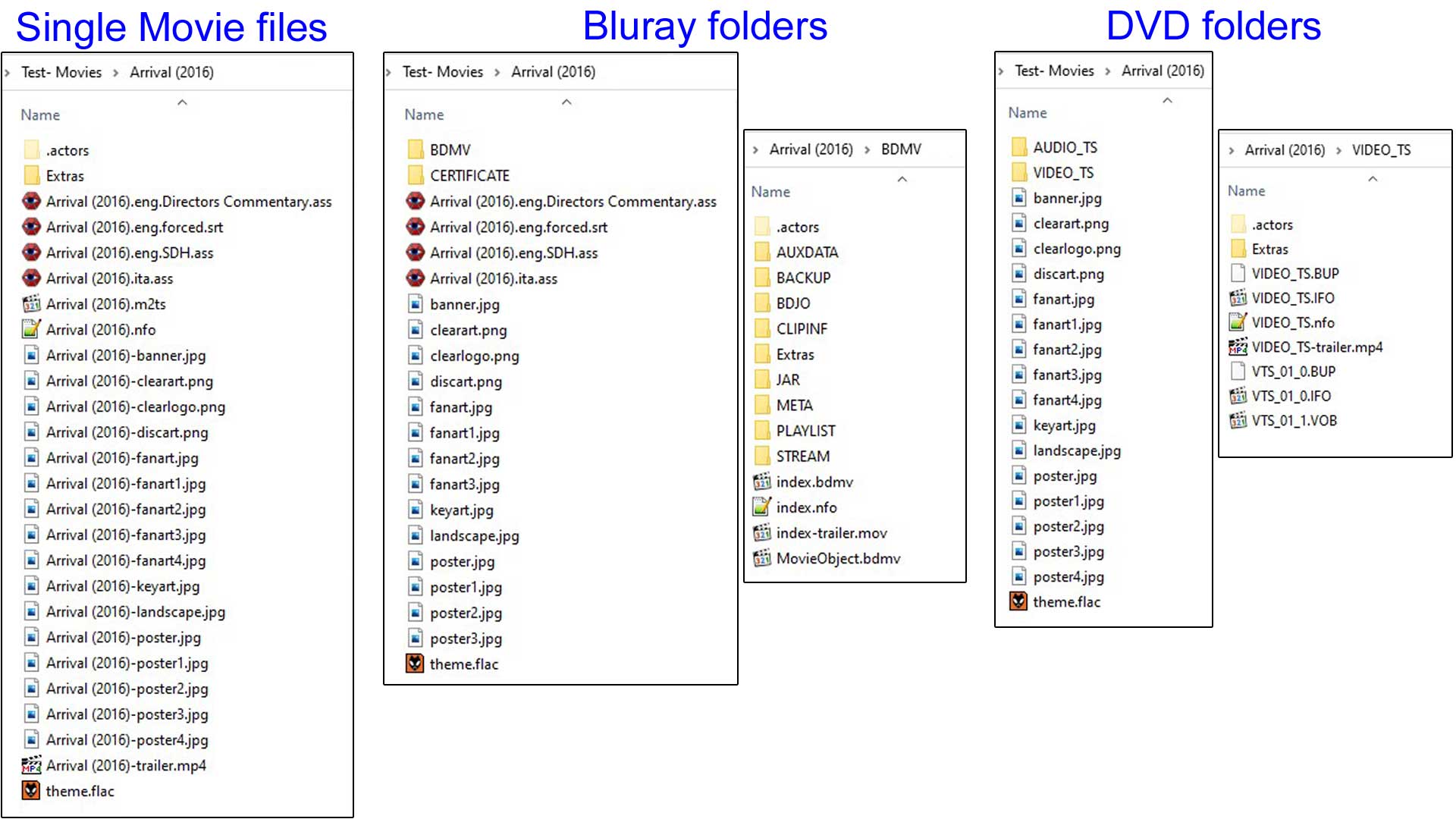 Example of correct use of Movie Folder with artwork, nfo file, trailer and theme.
Take note of file naming and location.

nfo Tags
The following table lists available XML tags. [1]
The "Required" column indicates whether a tag can be optionally added or ommitted when creating the nfo to suit your purpose. The less tags used, the less information added to the library.
| NFO (xml) Tag | Required | Multiple | Notes |
|---|---|---|---|
| <movie></movie> | Yes | No | The top level parent tag for the nfo file. All other tags must be contained within these two tags |
| <title></title> | Yes | No | The title for the movie |
| <originaltitle></originaltitle> | No | No | Displays the original title of the movie. For example, if the scraper is set to german language and the scraped movie in german is "Der mit dem Wolf tanzt" the original title will be "Dances with Wolves" |
| <sorttitle></sorttitle> | No | No | Allows alternate title sort without modifying movie title. Not displayed in any library listing. See: Sort Title |
 <ratings>
   <rating name="" max="10" default="">
      <value></value>
      <votes></votes>
   </rating>
 </ratings>
|
No | No | default="true" default="false"
name="identifier". Do not use "default". Examples of identifier include...
Example of complete entry...
|
| <userrating></userrating> | No | No | Personal rating set by the user |
| <top250></top250> | No | No | Ranking in IMDB Top 250 movies |
| <outline></outline> | Should be short, will be displayed on a single line (scraped from IMDB only) | ||
| <plot></plot> | Can contain more information on multiple lines, will be wrapped | ||
| <tagline></tagline> | No | No | Short movie slogan. "The true story of a real fake" is the tagline for "Catch me if you can" |
| <runtime></runtime> | No | No | Minutes only. If ommitted, Kodi will add runtime upon scanning |
| <thumb aspect="" preview=""></thumb> | No | Yes | Path to available Movie Posters. Not needed when using local artwork Example use of aspect=""
|
<fanart>
    <thumb preview=""></thumb>
</fanart>
|
No | Yes^ | Path to available movie fanart.
|
| <mpaa></mpaa> | No | No | Country specific mpaa rating system. Check with skin author which prefix is required to diplay your country certification flags |
| <playcount></playcount> | No | No | Number of times movie has been played. See... Import-Export |
| <lastplayed></lastplayed> | No | No | Date last played as yyyy-mm-dd |
| <id></id> | No | No | The default ID. Do not use. This is a Kodi generated tag. See next item. |
| <uniqueid type="" default=""></uniqueid> | Yes | Yes | The ID from the scraper site. type="" Identifier of the ID. Do not use "default". Examples of identifier include...
default="true" default="false"
Example of complete entry...
|
| <genre></genre> | No | Yes | Movie genre. |
| <tag></tag> | No | Yes | Library Tags. See...Video library tags |
<set> <name></name> <overview></overview> </set> |
No | No | Movie set tags The <overview> tag allows a short summary of the movie set. It can be displayed by some skins.
|
| <country></country> | No | Yes | Country of origin |
| <credits></credits> | No | Yes | Field for writers. |
| <director></director> | No | Yes | Movie Director |
| <premiered></premiered> | No | No | Release date of movie. Format as yyyy-mm-dd |
| <year></year> | No | No | Release Year. Note: Kodi v17: Tag deprecated, use <premiered> tag instead. Note: Kodi v20: Use <premiered> tag only. |
| <status></status> | No | No | Not used |
| <code></code> | No | No | Not used |
| <aired></aired> | No | No | Not used |
| <studio></studio> | No | Yes | Production studio |
| <trailer></trailer> | No | No | Local or online path to movie trailer Do not add local path to trailer. Kodi will automatically scan for local trailers. See... Trailers |
<fileinfo>
   <streamdetails>
     <video>
       <codec></codec>
       <aspect></aspect>
       <width></width>
       <height></height>
       <durationinseconds></durationinseconds>
       <stereomode></stereomode>
       <hdrtype></hdrtype>
     </video>
     <audio>
       <codec></codec>
       <language></language>
       <channels></channels>
     </audio>
     <subtitle>
       <language></language>
     </subtitle>
   </streamdetails>
</fileinfo>
|
No | Yes | For a full list of values, see the next section "Values" below.
Multiple entries of <audio> and <subtitles> accepted |
<actor> <name></name> <role></role> <order></order> <thumb></thumb> </actor> |
No | Yes | The <order> tag determines where in the list the actor will appear. 0 = first in the list |
| <showlink></showlink> | No | No | Connect movie to TV Show. Use the TV Show <title></title> name. |
<resume> <position></position> <total></total> </resume> |
No | No | Movie resume point in Seconds See... Import-Export |
| <dateadded></dateadded> | No | No | mTime of the playable video file. Can be altered in advancedsettings.xml See... Advancedsettings.xml#videolibrary |
| <originallanguage></originallanguage> | No | No | Main spoken language of the movie (import: ISO 639-1, 639-2, BCP 47 or English language name. export: BCP 47) example uses:
Added in Kodi v22 |
Values
Possible values for tags.
fileinfo
Kodi reads details the streams contained in the video file. These values are added to the database. Some values match a predetermined list (eg codec) while others are free form (eg width/height).
The current predetermined list for the <fileinfo></fileinfo> child tags can be found on Github...

|
[1] |
video
<codec></codec>
| Extended content |
|---|
|
3iv2 av1 avc1 div2 div3 divx divx 4 dx50 flv h264 microsoft mp42 mp43 mp4v mpeg1video mpeg2video mpg4 rv40 svq1 svq3 theora vp6f wmv2 wmv3 wvc1 xvid |
<aspect></aspect>
| Extended content |
|---|
|
1.00 1.19 1.33 1.37 1.66 1.78 1.85 2.00 2.20 2.35 2.40 2.55 2.76 |
<stereomode></stereomode>
| Extended content |
|---|
|
mono split_vertical split_horizontal row_interleaved anaglyph_cyan_red anaglyph_green_magenta |
<hdrtype></hdrtype>
| Extended content |
|---|
|
empty = SDR hdr10 dolbyvision hlg |
audio
<codec></codec>
| Extended content |
|---|
|
aac aac_lc he_aac he_aac_v2 aac_ssr aac_ltp ac3 cook dca dtshd_hra dtshd_ma dtshd_ma_x dtshd_ma_x_imax eac3 eac3_ddp_atmos mp1 mp2 mp3 pcm_s16be pcm_s16le pcm_u8 truehd truehd_atmos vorbis wmapro wmav2 |
<language></language>
Use 3-letter language code
<channels></channels>
| Extended content |
|---|
|
1 2 4 5 6 8 10 |
subtitle
<language></language>
Use 3-letter language code
References
| Return to top |
|---|