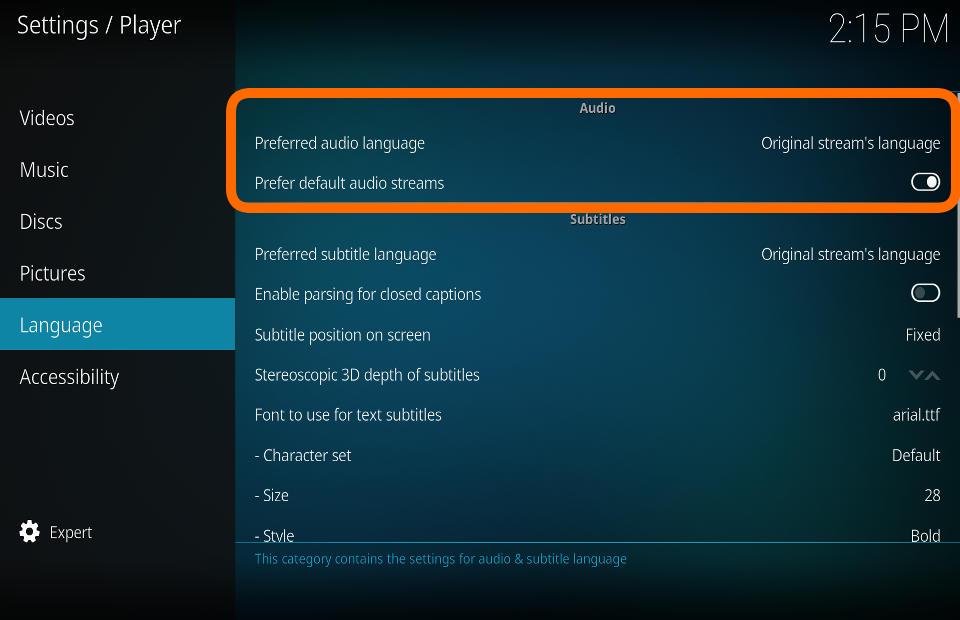
This category contains the settings for audio & subtitle language
Audio Preferred Audio Language
Settings level: Basic
Description:
Defaults to the selected audio language if more than one language is available
Prefer default audio streams
Settings level: Standard
Description:
If enabled, audio streams that are flagged as default (and match the preferred language) are preferred over audio streams with higher quality (number of channels, codec, ...)
Subtitles File:SettingsPlayerLanguage-leia1.jpg Preferred Subtitle Language
Settings level: Basic
Description:
Defaults to the selected subtitle language if more than one language is available
Enable parsing for closed captions
Settings level: Standard
Description:
Enable to parse for CC in video streams. Puts slightly more load on the CPU.
Subtitle position on screen
Settings level: Advanced
Description:
Location of subtitles on screen. Options are: Fixed, Bottom of video, Below video, Top of video, Above video
Stereoscopic 3D depth of subtitles
Settings level: Advanced
Description:
Sets the visual depth of subtitles for stereoscopic 3D videos. The higher the value, the closer the subtitles will appear to the viewer.
File:SettingsPlayerLanguage-leia2.jpg Font to use for text subtitles
Settings level: Standard
Description:
Set the font type to be used for text based (usually downloaded) subtitles.
Character set
Settings level: Standard
Description:
Set the font character set to be used for subtitles
Size
Settings level: Expert
Description:
Set the font size to be used for subtitles.
Style
Settings level: Expert
Description:
Set the font style to be used for subtitles.
Colour
Settings level: Expert
Description:
Set the font colour to be used for subtitles.
Background colour
Settings level: Expert
Description:
Set the colour to be used for the subtitle background
Background opacity
Settings level: Expert
Description:
Set the subtitle background opacity
Override ASS/SSA subtitle fonts
Settings level: Expert
Description:
If predefined fonts are given with the subtitle file enable this setting to override them.
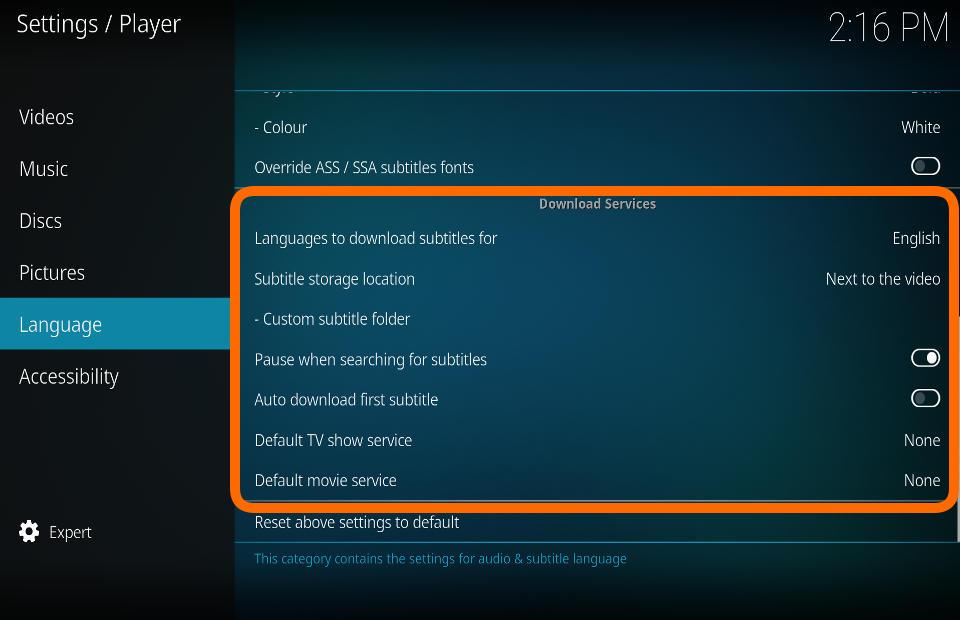
Download Services Languages to download subtitles for
Settings level: Standard
Description:
Set languages to use when searching for subtitles. Note: Not all subtitle services will use all languages.
Subtitle storage location
Settings level: Advanced
Description:
Specify where downloaded subtitles should be saved, the same location as the video or a custom location.
Custom subtitle folder
Settings level: Advanced
Description:
Set a custom directory for your subtitles. This can be a file share.
Pause when searching for subtitles
Settings level: Advanced
Description:
Pause the current video while searching for subtitles and resume once the subtitle is available.
Auto download first subtitle
Settings level: Advanced
Description:
Automatically download first subtitle from the search result list.
Default TV service
Settings level: Standard
Description:
Select the service that will be used as default to search for TV-show subtitles.
Default movie service
Settings level: Standard
Description:
Select the service that will be used as default to search for movie subtitles.