Special protocol: Difference between revisions
Thofficial (talk | contribs) Fix capitalization |
|||
| (17 intermediate revisions by 4 users not shown) | |||
| Line 1: | Line 1: | ||
{{mininav|[[Development]]}} | {{mininav|[[Development]]}} | ||
<section begin="intro" />The "Special Protocol" is Kodi's solution to platform dependent directories. Common directory names are assigned a special://[name] path which is passed around inside Kodi and then translated to the platform specific path before the operating system sees it | <section begin="intro" />The "Special Protocol" is Kodi's solution to platform dependent directories. Common directory names are assigned a <code>special://[name]</code> path which is passed around inside Kodi and then translated to the platform specific path before the operating system sees it.<section end="intro" /> | ||
== Available Paths == | |||
Below is a list of commonly used protocols. Further protocols for specific and limited uses can be found on GitHub. | |||
* '''special://subtitles''' | {| class="prettytable" | ||
|- | |||
! Path | |||
! Description | |||
|- | |||
| <code>'''library://music/'''</code> | |||
| This path points to the Music Library folders and to the File Sources | |||
|- | |||
| <code>'''library://video/'''</code> | |||
| This path points to the Video Library folders and to the File Sources | |||
|- | |||
| * * * * * | |||
|- | |||
| <code>'''special://cdrips'''</code> | |||
| This path contains the tracks from CDs you rip with Kodi. You will be asked to specify this directory the first time you rip a CD. | |||
|- | |||
| <code>'''special://database'''</code> | |||
| This path contains the database files Kodi uses to store library info. Normally special://masterprofile/Database. | |||
|- | |||
| <code>'''special://home'''</code> | |||
| Leads to the [[Kodi_data_folder]]. | |||
|- | |||
| <code>'''special://home/addons'''</code> | |||
| Directory where addons are installed after installation. Does not include default addons installed with {{kodi}}. | |||
|- | |||
| <code>'''special://home/media'''</code> | |||
| Leads to the \media\ folder in the [[Kodi_data_folder]]. | |||
|- | |||
| <code>'''special://home/media/Fonts'''</code> | |||
| Directory where user defined fonts are located. | |||
|- | |||
| <code>'''special://logpath'''</code> | |||
| This path points to the path where the [[log file]] is saved. | |||
|- | |||
| <code>'''special://masterprofile'''</code> | |||
| Kodi's main configuration directory. Normally located at special://home/userdata, this directory contains global settings and sources, as well as any Kodi profile directories. Normally special://home/userdata | |||
|- | |||
| <code>'''special://musicartistsinfo'''</code> | |||
| This path points to the [[Artist_information_folder]] if one has been set. | |||
|- | |||
| <code>'''special://musicplaylists'''</code> | |||
| This path contains saved music playlists. Normally special://profile/playlists/music. | |||
|- | |||
| <code>'''special://profile/playlists'''</code> | |||
| Parent folder of ''special://videoplaylists'' and ''special://musicplaylists'' and will allow access to the ''Mixed'' playlist folder | |||
|- | |||
| <code>'''special://profile/addon_data'''</code> | |||
| This path leads to the addon_data folder located in the [[Userdata]] folder. It contains user modified settings for installed add-ons. | |||
|- | |||
| <code>'''special://profile'''</code> | |||
| Kodi's currently active profile directory. This directory points at special://masterprofile/''profile_name'' (or special://masterprofile if no profile is in use) and contains per profile overrides for settings and sources. | |||
|- | |||
| <code>'''special://recordings'''</code> | |||
| This path contains saved [[PVR]] recordings. | |||
|- | |||
| <code>'''special://screenshots'''</code> | |||
| This path contains Kodi screen shots. You will be asked to specify this directory the first time you take a screen shot. | |||
|- | |||
| <code>'''special://skin'''</code> | |||
| This path points to the currently active skin's root directory. | |||
|- | |||
| <code>'''special://subtitles'''</code> | |||
| User defined custom subtitle path. Set it in Video Settings. | |||
|- | |||
| <code>'''special://temp'''</code> | |||
| Kodi's temporary directory. This path is used to cache various data during normal usage. Unless you need the log, nothing in this directory is detrimental to Kodi's operation. Normally special://home/temp | |||
|- | |||
| <code>'''special://temp/fonts'''</code> | |||
| A temporary font path where MKV fonts are extracted and temporarily stored. | |||
|- | |||
| <code>'''special://thumbnails'''</code> | |||
| This path contains cached thumbnails. Normally special://masterprofile/Thumbnails | |||
|- | |||
| <code>'''special://userdata'''</code> | |||
| Alias from special://masterprofile. | |||
|- | |||
| <code>'''special://videoplaylists'''</code> | |||
| This path contains saved video playlists. Normally special://profile/playlists/video. | |||
|- | |||
| <code>'''special://xbmc'''</code> | |||
| Kodi's installation root directory. This path is read-only contains the Kodi binary, support libraries and default configuration files, skins, scripts and plugins. Users should not modify files or install addons in this directory. | |||
: {{Note|The special://xbmc/ path is still valid . special://kodi/ does '''not''' exist yet.}} | |||
|- | |||
| <code>'''special://xbmc/media/Fonts'''</code> | |||
| Directory where Kodi bundled fonts files are located. | |||
|- | |||
| <code>'''special://xbmc/system'''</code> | |||
| This path points to the System folder in Kodi's installation root directory. | |||
|- | |||
| <code>'''special://xbmcbinaddons'''</code> | |||
| This path points to the addon folder in Kodi's installation root directory. | |||
|- | |||
| * * * * * | |||
|- | |||
| <code>'''sources://music'''</code> | |||
| This path points to the music source folders. | |||
|- | |||
| <code>'''sources://video'''</code> | |||
| This path points to the video source folders. | |||
|} | |||
= Applying Special Protocols = | |||
Special Protocols are used in the {{Kodi}} File Manager. The below images will guide you through the process. | |||
<gallery mode="packed" widths="500px" heights="283px"> | |||
File:SettingsOverview-leia.png| '''Image 1'''- Access File Manager from the Settings page | |||
File:SpecialProtocol01.jpg| '''Image 2'''- Select '''Add source''' | |||
File:SpecialProtocol02.jpg| '''Image 3'''- Select the '''<none>''' entry | |||
File:SpecialProtocol03.jpg| '''Image 4'''- Type in or paste the Special Protocol then select OK | |||
File:SpecialProtocol04.jpg| '''Image 5'''- Once you confirm the protocol has been correctly entered, select OK | |||
</gallery> | |||
The newly added Special Protocol should now be available in the File Manager listing (image 2). | |||
* | = Default OS mappings = | ||
* Bulleted list item | |||
* '''special:// | == Android == | ||
* '''special://xbmc''' - /data/data/org.xbmc.kodi/cache/apk/assets/ | |||
* '''special://home''' - /sdcard/Android/data/org.xbmc.kodi/files/.kodi/ | |||
* '''special://temp''' - /sdcard/Android/data/org.xbmc.kodi/files/.kodi/temp/ | |||
== | == iOS == | ||
=== Apple TV 2 (black) === | |||
* '''special://xbmc''' - /private/var/stash/Applications/Kodi.frappliance/KodiData/KodiHome | |||
* '''special://home''' - /private/var/mobile/Library/Preferences/Kodi | |||
* '''special://temp''' - /private/var/mobile/Library/Preferences/Kodi/temp | |||
=== | === iDevice === | ||
* '''special://xbmc''' - | * '''special://xbmc''' - /Applications/Kodi.app/KodiData/KodiHome {{highlight|''<- Symbolic link, but the real path has some random characters in it.''}} | ||
* '''special://home''' - | * '''special://home''' - /private/var/mobile/Library/Preferences/Kodi | ||
* '''special://temp''' - | * '''special://temp''' - private/var/mobile/Library/Preferences/Kodi/temp | ||
== Linux == | |||
* '''special://xbmc''' - /usr/share/kodi when installed from a binary package (ie PPA, rpm, deb, etc). /usr/local/share/kodi when compiled (unless you specify an alternate prefix) | * '''special://xbmc''' - /usr/share/kodi when installed from a binary package (ie PPA, rpm, deb, etc). /usr/local/share/kodi when compiled (unless you specify an alternate prefix) | ||
* '''special://home''' - /home/''[username]''/.kodi | * '''special://home''' - /home/''[username]''/.kodi | ||
:: {{Note|The '.', this directory is hidden so you may need to enable hidden files in your file manager to see it.}} | :: {{Note|The '.', this directory is hidden so you may need to enable hidden files in your file manager to see it.}} | ||
== Windows | == Mac OS X == | ||
* '''special://xbmc''' - /Applications/Kodi.app/Contents/Resources/Kodi | |||
* '''special://home''' - /Users/''[username]''/Library/Application Support/Kodi | |||
* '''special://temp''' - /Users/''[username]''/.kodi/temp | |||
:: {{Note|The '.', this directory is hidden so you need to enable hidden files to see it.}} | |||
== webOS == | |||
* '''special://xbmc''' - /media/developer/apps/usr/palm/applications/org.xbmc.kodi | |||
* '''special://home''' - /media/developer/apps/usr/palm/applications/org.xbmc.kodi/.kodi | |||
* '''special://temp''' - /media/developer/apps/usr/palm/applications/org.xbmc.kodi/.kodi/temp | |||
== Windows == | |||
This assumes your Windows install drive is C:. Replace as necessary. | This assumes your Windows install drive is C:. Replace as necessary. | ||
* '''special://xbmc''' - C:\Program Files\Kodi | * '''special://xbmc''' - C:\Program Files\Kodi | ||
| Line 54: | Line 169: | ||
* '''special://home''' - C:\Users\''[username]''\AppData\Roaming\Kodi | * '''special://home''' - C:\Users\''[username]''\AppData\Roaming\Kodi | ||
=== Portable Mode === | |||
In portable mode, Kodi is entirely self contained, so its install directory must be writable. | In portable mode, Kodi is entirely self contained, so its install directory must be writable. | ||
* '''special://xbmc''' - Where ever you installed Kodi (MUST be writable). | * '''special://xbmc''' - Where ever you installed Kodi (MUST be writable). | ||
* '''special://home''' - special://xbmc | * '''special://home''' - special://xbmc/portable_data | ||
= See also = | |||
* [[Userdata]] | * [[Userdata]] | ||
* [[Development]] | * [[Development]] | ||
* [[ | * [[Opening_Windows_and_Dialogs]] | ||
{{top}} | |||
{{ | {{updated|21}} | ||
[[Category:Add-on development]] | [[Category:Add-on development]] | ||
[[Category:Skin development]] | [[Category:Skin development]] | ||
[[Category:Development]] | [[Category:Development]] | ||
[[Category:Advanced topics]] | [[Category:Advanced topics]] | ||
[[Category:Karellen]] | |||
Latest revision as of 10:22, 21 October 2025

|
 Development Development |
Special protocol
|
The "Special Protocol" is Kodi's solution to platform dependent directories. Common directory names are assigned a special://[name] path which is passed around inside Kodi and then translated to the platform specific path before the operating system sees it.
Available Paths
Below is a list of commonly used protocols. Further protocols for specific and limited uses can be found on GitHub.
| Path | Description |
|---|---|
library://music/
|
This path points to the Music Library folders and to the File Sources |
library://video/
|
This path points to the Video Library folders and to the File Sources |
| * * * * * | |
special://cdrips
|
This path contains the tracks from CDs you rip with Kodi. You will be asked to specify this directory the first time you rip a CD. |
special://database
|
This path contains the database files Kodi uses to store library info. Normally special://masterprofile/Database. |
special://home
|
Leads to the Kodi_data_folder. |
special://home/addons
|
Directory where addons are installed after installation. Does not include default addons installed with Kodi. |
special://home/media
|
Leads to the \media\ folder in the Kodi_data_folder. |
special://home/media/Fonts
|
Directory where user defined fonts are located. |
special://logpath
|
This path points to the path where the log file is saved. |
special://masterprofile
|
Kodi's main configuration directory. Normally located at special://home/userdata, this directory contains global settings and sources, as well as any Kodi profile directories. Normally special://home/userdata |
special://musicartistsinfo
|
This path points to the Artist_information_folder if one has been set. |
special://musicplaylists
|
This path contains saved music playlists. Normally special://profile/playlists/music. |
special://profile/playlists
|
Parent folder of special://videoplaylists and special://musicplaylists and will allow access to the Mixed playlist folder |
special://profile/addon_data
|
This path leads to the addon_data folder located in the Userdata folder. It contains user modified settings for installed add-ons. |
special://profile
|
Kodi's currently active profile directory. This directory points at special://masterprofile/profile_name (or special://masterprofile if no profile is in use) and contains per profile overrides for settings and sources. |
special://recordings
|
This path contains saved PVR recordings. |
special://screenshots
|
This path contains Kodi screen shots. You will be asked to specify this directory the first time you take a screen shot. |
special://skin
|
This path points to the currently active skin's root directory. |
special://subtitles
|
User defined custom subtitle path. Set it in Video Settings. |
special://temp
|
Kodi's temporary directory. This path is used to cache various data during normal usage. Unless you need the log, nothing in this directory is detrimental to Kodi's operation. Normally special://home/temp |
special://temp/fonts
|
A temporary font path where MKV fonts are extracted and temporarily stored. |
special://thumbnails
|
This path contains cached thumbnails. Normally special://masterprofile/Thumbnails |
special://userdata
|
Alias from special://masterprofile. |
special://videoplaylists
|
This path contains saved video playlists. Normally special://profile/playlists/video. |
special://xbmc
|
Kodi's installation root directory. This path is read-only contains the Kodi binary, support libraries and default configuration files, skins, scripts and plugins. Users should not modify files or install addons in this directory.
|
special://xbmc/media/Fonts
|
Directory where Kodi bundled fonts files are located. |
special://xbmc/system
|
This path points to the System folder in Kodi's installation root directory. |
special://xbmcbinaddons
|
This path points to the addon folder in Kodi's installation root directory. |
| * * * * * | |
sources://music
|
This path points to the music source folders. |
sources://video
|
This path points to the video source folders. |
Applying Special Protocols
Special Protocols are used in the Kodi File Manager. The below images will guide you through the process.
-
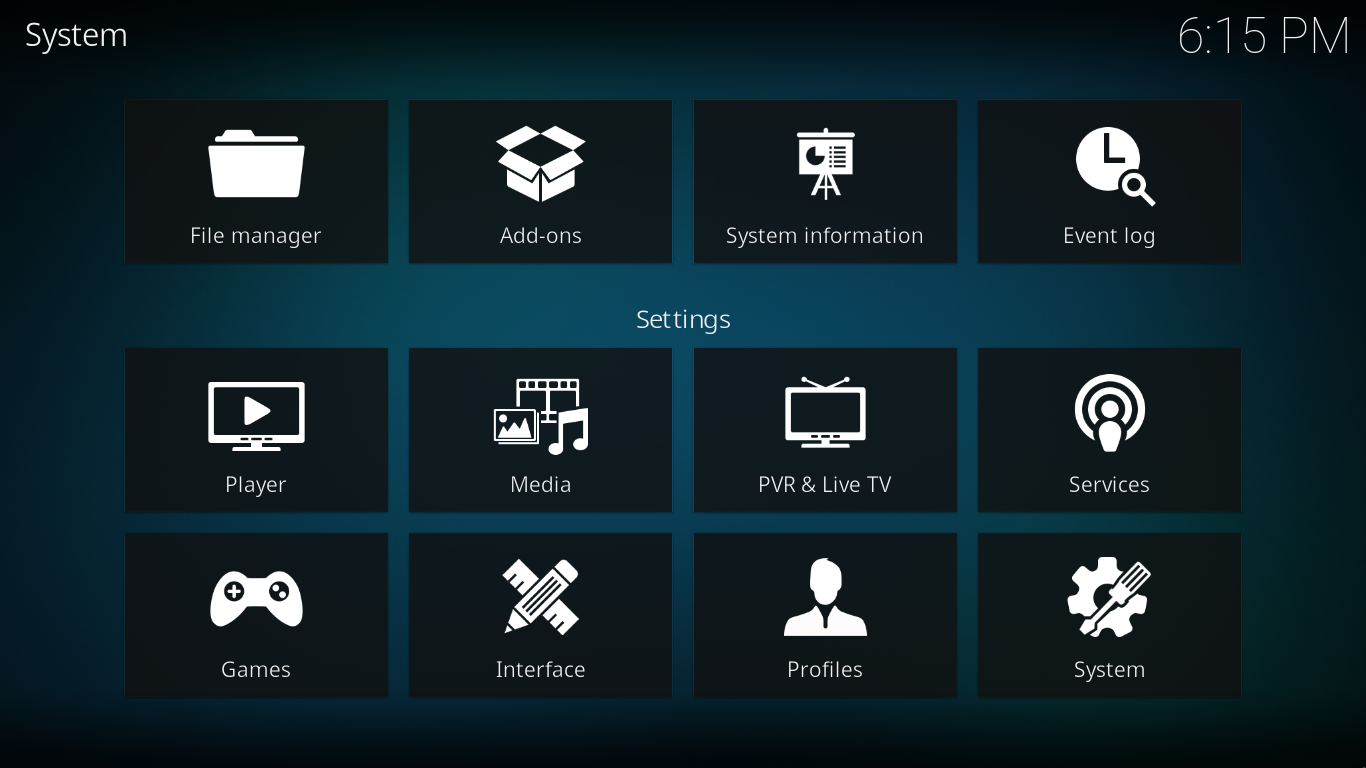 Image 1- Access File Manager from the Settings page
 -
 Image 2- Select Add source
 -
 Image 3- Select the <none> entry
 -
 Image 4- Type in or paste the Special Protocol then select OK
 -
 Image 5- Once you confirm the protocol has been correctly entered, select OK


The newly added Special Protocol should now be available in the File Manager listing (image 2).
Default OS mappings
- Bulleted list item
Android
- special://xbmc - /data/data/org.xbmc.kodi/cache/apk/assets/
- special://home - /sdcard/Android/data/org.xbmc.kodi/files/.kodi/
- special://temp - /sdcard/Android/data/org.xbmc.kodi/files/.kodi/temp/
iOS
Apple TV 2 (black)
- special://xbmc - /private/var/stash/Applications/Kodi.frappliance/KodiData/KodiHome
- special://home - /private/var/mobile/Library/Preferences/Kodi
- special://temp - /private/var/mobile/Library/Preferences/Kodi/temp
iDevice
- special://xbmc - /Applications/Kodi.app/KodiData/KodiHome <- Symbolic link, but the real path has some random characters in it.
- special://home - /private/var/mobile/Library/Preferences/Kodi
- special://temp - private/var/mobile/Library/Preferences/Kodi/temp
Linux
- special://xbmc - /usr/share/kodi when installed from a binary package (ie PPA, rpm, deb, etc). /usr/local/share/kodi when compiled (unless you specify an alternate prefix)
- special://home - /home/[username]/.kodi
- Note: The '.', this directory is hidden so you may need to enable hidden files in your file manager to see it.
Mac OS X
- special://xbmc - /Applications/Kodi.app/Contents/Resources/Kodi
- special://home - /Users/[username]/Library/Application Support/Kodi
- special://temp - /Users/[username]/.kodi/temp
- Note: The '.', this directory is hidden so you need to enable hidden files to see it.
webOS
- special://xbmc - /media/developer/apps/usr/palm/applications/org.xbmc.kodi
- special://home - /media/developer/apps/usr/palm/applications/org.xbmc.kodi/.kodi
- special://temp - /media/developer/apps/usr/palm/applications/org.xbmc.kodi/.kodi/temp
Windows
This assumes your Windows install drive is C:. Replace as necessary.
- special://xbmc - C:\Program Files\Kodi
- special://xbmc - C:\Program Files (x86)\Kodi (Windows 64 bit)
- special://home - C:\Users\[username]\AppData\Roaming\Kodi
Portable Mode
In portable mode, Kodi is entirely self contained, so its install directory must be writable.
- special://xbmc - Where ever you installed Kodi (MUST be writable).
- special://home - special://xbmc/portable_data
See also
| Return to top |
|---|