Settings/Player/Pictures: Difference between revisions
Jump to navigation
Jump to search
No edit summary |
No edit summary |
||
| Line 1: | Line 1: | ||
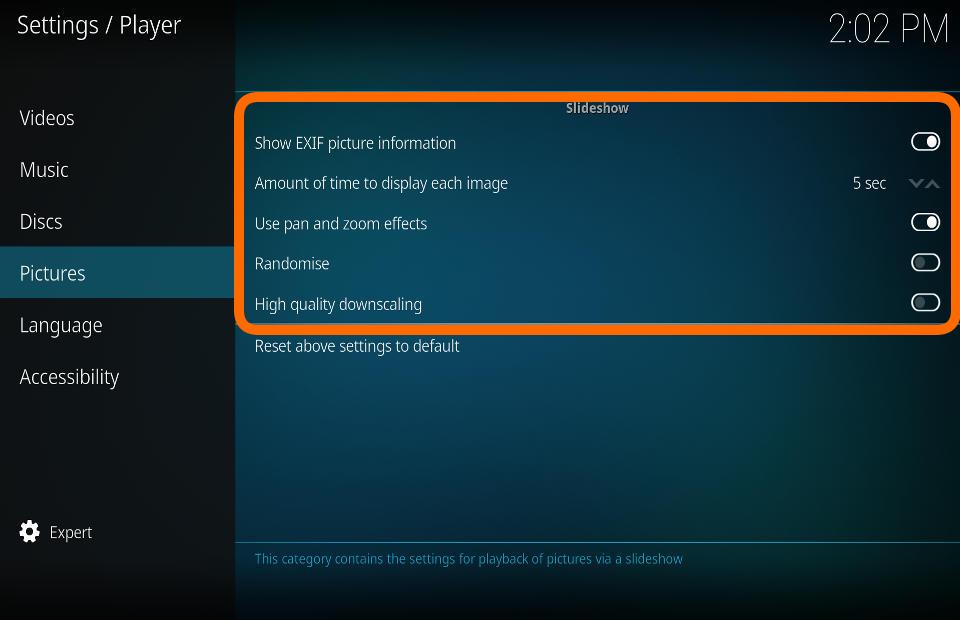
This category contains the settings for playback of pictures via a slideshow. | |||
== Slideshow == | == Slideshow == | ||
[[File:Player_pictures_slideshow.jpg|500px|right]] | |||
=== Show EXIF picture information === | |||
{| | |||
|- valign="top" | |||
| width=120px | {{nowrap|'''Settings level:'''}} | |||
| Standard | |||
|- valign="top" | |||
| '''Description:''' | |||
| If EXIF information exists (date, time, camera used, etc.), it will be displayed | |||
|} | |||
=== Amount of time to display each image === | |||
{| | |||
|- valign="top" | |||
| width=120px | {{nowrap|'''Settings level:'''}} | |||
| Basic | |||
|- valign="top" | |||
| '''Description:''' | |||
| Select the amount of time that each image is displayed in a slideshow | |||
|} | |||
Randomise - | === Use pan and zoom effects === | ||
{| | |||
|- valign="top" | |||
| width=120px | {{nowrap|'''Settings level:'''}} | |||
| Standard | |||
|- valign="top" | |||
| '''Description:''' | |||
| Images in a slideshow will pan and zoom while displayed | |||
|} | |||
=== Randomise === | |||
{| | |||
|- valign="top" | |||
| width=120px | {{nowrap|'''Settings level:'''}} | |||
| Basic | |||
|- valign="top" | |||
| '''Description:''' | |||
| View slideshow in a random order | |||
|} | |||
=== High quality downscaling === | |||
{| | |||
|- valign="top" | |||
| width=120px | {{nowrap|'''Settings level:'''}} | |||
| Standard | |||
|- valign="top" | |||
| '''Description:''' | |||
| Enable high quality downscaling of pictures (uses more memory and has moderate performance impact) | |||
|} | |||
Revision as of 12:12, 20 July 2017
This category contains the settings for playback of pictures via a slideshow.
Slideshow

Show EXIF picture information
| Settings level: | Standard |
| Description: | If EXIF information exists (date, time, camera used, etc.), it will be displayed |
Amount of time to display each image
| Settings level: | Basic |
| Description: | Select the amount of time that each image is displayed in a slideshow |
Use pan and zoom effects
| Settings level: | Standard |
| Description: | Images in a slideshow will pan and zoom while displayed |
Randomise
| Settings level: | Basic |
| Description: | View slideshow in a random order |
High quality downscaling
| Settings level: | Standard |
| Description: | Enable high quality downscaling of pictures (uses more memory and has moderate performance impact) |