Add-on:OzWeather: Difference between revisions
m Addon-Bot repo category update |
m Addon-Bot Update |
||
| (3 intermediate revisions by 2 users not shown) | |||
| Line 3: | Line 3: | ||
|provider-name=Bossanova808 | |provider-name=Bossanova808 | ||
|ID=weather.ozweather | |ID=weather.ozweather | ||
|latest-version=2. | |latest-version=2.2.0 | ||
|extension point=xbmc.python.weather | |extension point=xbmc.python.weather | ||
|provides= | |provides= | ||
| Line 12: | Line 12: | ||
|License=GPL-3.0-only | |License=GPL-3.0-only | ||
|Forum=https://forum.kodi.tv/showthread.php?tid=116905 | |Forum=https://forum.kodi.tv/showthread.php?tid=116905 | ||
|Website=https://kodi.wiki/index.php?title=Add-on: | |Website=https://kodi.wiki/index.php?title=Add-on:OzWeather | ||
|Source=https://github.com/bossanova808/weather.ozweather | |Source=https://github.com/bossanova808/weather.ozweather | ||
|broken= | |broken= | ||
|icon url=http://mirrors.kodi.tv/addons/omega/weather.ozweather/icon.png}} | |icon url=http://mirrors.kodi.tv/addons/omega/weather.ozweather/icon.png}} | ||
This add-on is actively supported and currently works with Kodi Matrix & later version. (Historically, it has been continuously supported since the days of XBMC Frodo, way back in 2011!). | |||
Support, discussion, release notification:[https://forum.kodi.tv/showthread.php?tid=116905 on the Kodi forum thread]. | |||
(If you like it and use it, and want to support it surviving into the future, there is a 'buy me a coffee' link in the first post in the forum thread). | |||
OzWeather is the only Kodi weather add-on to source it's data directly from the BOM API (Australian Bureau of Meteorology) - this is really the only authoritative, high quality source for weather data in Australia. | |||
You may also be interested in a companion project - a '10-foot Dashboard' system to display Kodi Now Playing and Australian Weather information (again, source from the BOM). Information on that is [https://github.com/bossanova808/10-foot.dash here]. This is a great way to re-purpose an old phone or tablet you have lying around. | |||
===== OzWeather Features ===== | |||
* Animated BOM radar maps (ee notes on an addon to perform the skin changes needed for this, below) | |||
* Auto locates your closest radar, but you can override this and choose any BOM radar loop if you wish | |||
* You can slo create multiple locations that show the same weather data but different radar ranges, if you want e.g. a long and short range view. | |||
* 7 Day Forecasts | |||
* Today's extended forecast | |||
* Direct button access to the 'ABC National Weather Update in 90 Seconds' video report | |||
* Utility provided below to make patching skin files easy (supports: Estuary/Estouchy/Confluence/Confluence Zeitgeist/Xonfluence/OSMC/Amber/Aeon Nox Silvo/Aeon Tajo - more by request...) | |||
* Mini weather when you pause video & display video information etc. if you want (Confluence/Estuary only currently). | |||
Version 2 of the addon (June 2021 on), looks like this: | |||
<gallery> | |||
File:OzWeather_V2_Estuary.jpg|OzWeather in Estuary | |||
File:OzWeather V2 Confluence.jpg|...in Confluence | |||
File:OzWeather-Amber.jpg|...in Amber | |||
</gallery> | |||
...you get the idea... (all of these are using the SkinPatcher mentioned below to easily & automatically customise the Weather section). | |||
==== Instructions ==== | |||
Go into Get More Add-Ons and choose Weather -> OzWeather... (Oz Weather is in the official Kodi repository). For radar support, see notes below on skin changes and a tool to help with this. | |||
'''NB Troubleshooting: if you experience errors running OzWeather, particularly if using profiles other than the default Master profile, please check in Settings->System->Addons->Manage Dependencies and make sure that the Bossanova808 dependencies, pytz, requests and urllib3 modules are all enabled!''' | |||
To Configure - First, go to Kodi settings->Weather and choose the OzWeather add on as your selected weather information add on. | |||
In the addon settings you can add up to six BOM locations - you can enter either your postcode or suburb & OzWeather will prompt you to choose from a list of matching locations. | |||
If you enable the extended features (see skin changes required below!) - you can also have animated radars. When you add a new location, OzWeather auto-selects the closest radar to it - but you can overrule this if you wish by manually putting in any BOM radar code. | |||
To manually get a radar code: | |||
The easiest way is to click on a desired point on this [https://reg.bom.gov.au/australia/radar/ BOM MAP]. Then click the range you like the best (in the Radar line, e.g. 128 or 256km) - then you will see the code in the resulting url - e.g. | |||
IDR023 | |||
(N.B. you need to use the code verbatim as it appears in the URL, including the 'IDR' and the correct number of preceeding 0s!). | |||
Another way to manually find a radar code is to use the search/filter field about half way down [https://www.bom.gov.au/catalogue/anon-ftp.shtml this page] to the right, and enter a radar location - you can use [https://www.bom.gov.au/resources/learn-and-explore/radar-and-equipment-knowledge-centre/weather-radars#bom-anchor-list__item-weather-radar-coverage-in-australia this map] to find the radar locations. | |||
There is also a more formal [https://reg.bom.gov.au/catalogue/Bureau_of_Meteorology_radar_images_user_guide.pdf PDF document] about this. | |||
Important: not all codes actually work all the time, as some radars are only in part time use. The main capital city ones work reliably, e.g. IDR023 above which is the Melbourne 128km loop, or try IDR00004 for a nice national radar. OzWeather wants the radar to be there, so if you're experiencing reliability issues, try another radar. | |||
Notes: | |||
If ever you experience issues with missing radar ''background'' images, wait a day or two, then use the 'purge backgrounds on next refresh' option in the add-on 'Troubleshooting' settings. With luck your backgrounds will be re-downloaded successfully on the next weather retrieval run. | |||
==== Skin Changes ==== | |||
If you enable the extended forecasts & radar, skin changes are required to see this content. | |||
'''Utility to Patch Skins''' | |||
If you're on Kodi Matrix and above, and you're using one of these skins: | |||
* Estuary (& Plextuary) | |||
* Estouchy | |||
* Amber | |||
* Aeon Nox Silvo | |||
* Aeon Tajo | |||
* OSMC Skin | |||
* Confluence | |||
* Confluence Zeitgeist | |||
* Xonfluence | |||
* (Other similar derivatives of Estuary/Aeon/Confluence or whatever ''may'' also work...) | |||
...I have written a utility tool to make this MUCH easier. It can automatically patch the skin for you and (as of October '25) - will even do so automatically every time a new skin OR OzWeather update comes along (you can turn off this auto-patching, if you wish, of course). | |||
'''Note that your skin folder MUST be writeable by the skin patcher addon''' for this to work (for the Core/Libre-ELEC editions of Kodi, see below, and if you're on some Android platforms, you _may_ need a rooted device - nothing I can do about this, sorry!). | |||
I am ''in theory'' happy to add support for other skins (and especially if you can develop & supply working skin files for the current Kodi version!) - just let me know what skin support you're after in the OzWeather forum thread. | |||
The Kodi team will not allow an addon that modifies skin file in to their main repository, understandably. Thus, to install the skin patcher utility - you will first need to install my repository. | |||
Download the latest .zip for that here: https://github.com/bossanova808/repository.bossanova808/tree/master/repository-downloads/repository.bossanova808 (n.b. make sure to use the actual download button, not the 'Raw' button!) | |||
Install that using 'install from zip' in the Kodi addons area, and then install the 'OzWeather Skin Patcher' add-on from that repository. Then, you just run it. It can both patch and restore your skin files as needed. After the initial patch, it will detect future skin/OzWeather updates, and automatically re-patch if needed. | |||
With Confluence and Estuary you get the added bonus of some weather info during playback when you show the video info. With Confluence either the Info (i) or Menu (m) will bring it up, with Estuary just the Menu (m). It looks roughly like this: | |||
<gallery> | |||
File:OzWeather Estuary - Seek.jpg|Now Playing Radar Support | |||
</gallery> | |||
'''Using Corelec / LibreElec with Estuary?''' | |||
In the case of the -ELEC editions of Kodi, unfortunately the main skin folder is '''not''' writeable. This is unfortunately just part of how the -ELEC versions of Kodi are set up. Here are your options: | |||
* Don't use Estuary! Use one of the other supported skins (as, let's face it, Estuary is a low point for Kodi default skins anyway, so you're really not missing much...) | |||
* Or - create your own version of Estuary. Copy the whole estuary folder into your (writeable) add-ons folder, modifying the addon id in addon.xml to give your version a unique name (e.g. skin.estuary-mymod). To then keep your special version of the skin up to date, create a script and set it up to run by cron (or alternatively add these commands to your autostart.sh if you're using one of those) - with the following content (changing the folder name to whatever you've named your personal skin of course): | |||
#!/bin/sh | |||
rsync -a --exclude 'addon.xml' --exclude 'MyWeather.xml' --exclude 'VideoFullScreen.xml' /usr/share/kodi/addons/skin.estuary/ /storage/.kodi/addons/skin.estuary-mymod/ | |||
/usr/bin/python /usr/bin/kodi-send -a ReloadSkin | |||
'''The Manual Approach''' | |||
Otherwise, if you're some sort of masochist, you can take a manual approach to patching your skin files , using these instructions/files...note that there are updates to these files in the skin patcher add on so use that if at all possible. | |||
You just need to copy some files into your skin/720p or skin/xml folder. Note this *will* break compatibility with other weather add ons, so best to back up the original files first if you're worried about this. Also, you'll have to do some manual search and replacing in the skin files, as the skin patcher uses a 'template tags' system to let folks change text and background colours. You'll need to manually do the equivalent of this python code: | |||
new_data = new_data.replace('_colour_text_default_', ADDON.getSetting('colour_text_default')) | |||
new_data = new_data.replace('_colour_text_dim_', ADDON.getSetting('colour_text_dim')) | |||
new_data = new_data.replace('_colour_text_dimmer_', ADDON.getSetting('colour_text_dimmer')) | |||
new_data = new_data.replace('_colour_text_high_temp_', ADDON.getSetting('colour_text_high_temp')) | |||
new_data = new_data.replace('_colour_text_low_temp_', ADDON.getSetting('colour_text_low_temp')) | |||
new_data = new_data.replace('_background_visible_', 'yes' if ADDON.getSettingBool('background_visible_bool') else 'no') | |||
new_data = new_data.replace('_background_opacity_', ADDON.getSetting('background_opacity')) | |||
(Another approach, perhaps, would be to run the skin patcher once, then grab the skin files it has generated with your preferred colours, and save those off somewhere for your later purposes...but of course you won't benefit from any future updates to those skin files...) | |||
The latest version of the skin files can be found at: https://github.com/bossanova808/repository.bossanova808/tree/master/staging/script.ozweather-skinpatcher/resources/skin-files | |||
'''...but for 99% of folks, the skin patcher add on above is the ''much'' easier alternative - so try that first!''' | |||
=== Support & Troubleshooting === | |||
I've been supporting this add on for 15+ years now. I use it myself, of course, and I keep it working as smoothly as the upstream sources allow me to. | |||
If things don't work as expected and you need to ask for help - always supply a link to a FULL DEBUG LOG so I have some real chance of helping you. I '''will''' check it and help, if you supply it. But log snippets, or logs without debug logging enable, are NOT enough. | |||
If you're having problems running the add on (and especially if you use Kodi profiles) - make sure that Bossanova808 dependencies, pytz, requests and urllib3 modules are ALL enabled, for the profile you're using specifically. (System -> Addons -> Manage Dependencies...). | |||
If using a manual radar code, do check your radar code carefully - is it _exactly_ as the BOM one - i.e. '''IDR023''' or similar. You '''must''' include the '''IDR''' part, and the right nu,ber of preceding 0s if there are any! Does the URL in the debug log load if you paste it in to your browser? | |||
Any issues, please post them [https://forum.kodi.tv/showthread.php?tid=116905 on the Kodi forum thread]. | |||
[[Category:Add-ons with license tag]] | [[Category:Add-ons with license tag]] | ||
Latest revision as of 01:02, 13 June 2026
| OzWeather | ||||||||||||||||
| ||||||||||||||||

|
 Add-ons Add-ons |
OzWeather
|

|
Need help with this add-on? See here. |
Weather forecasting and radar images for Australia using Bureau of Meteorology data. For full features (animated radars & ABC weather videos) - make sure you install the replacement skin files - see information at the addon wiki (https://kodi.wiki/index.php?title=Add-on:Oz_Weather).
Installing
This add-on is installed from the Add-on browser located in Kodi as follows:
- Settings
- Add-ons
- Install from repository
- Weather information
- OzWeather
- Install
This add-on is actively supported and currently works with Kodi Matrix & later version. (Historically, it has been continuously supported since the days of XBMC Frodo, way back in 2011!).
Support, discussion, release notification:on the Kodi forum thread. (If you like it and use it, and want to support it surviving into the future, there is a 'buy me a coffee' link in the first post in the forum thread).
OzWeather is the only Kodi weather add-on to source it's data directly from the BOM API (Australian Bureau of Meteorology) - this is really the only authoritative, high quality source for weather data in Australia.
You may also be interested in a companion project - a '10-foot Dashboard' system to display Kodi Now Playing and Australian Weather information (again, source from the BOM). Information on that is here. This is a great way to re-purpose an old phone or tablet you have lying around.
OzWeather Features
- Animated BOM radar maps (ee notes on an addon to perform the skin changes needed for this, below)
- Auto locates your closest radar, but you can override this and choose any BOM radar loop if you wish
- You can slo create multiple locations that show the same weather data but different radar ranges, if you want e.g. a long and short range view.
- 7 Day Forecasts
- Today's extended forecast
- Direct button access to the 'ABC National Weather Update in 90 Seconds' video report
- Utility provided below to make patching skin files easy (supports: Estuary/Estouchy/Confluence/Confluence Zeitgeist/Xonfluence/OSMC/Amber/Aeon Nox Silvo/Aeon Tajo - more by request...)
- Mini weather when you pause video & display video information etc. if you want (Confluence/Estuary only currently).
Version 2 of the addon (June 2021 on), looks like this:
-
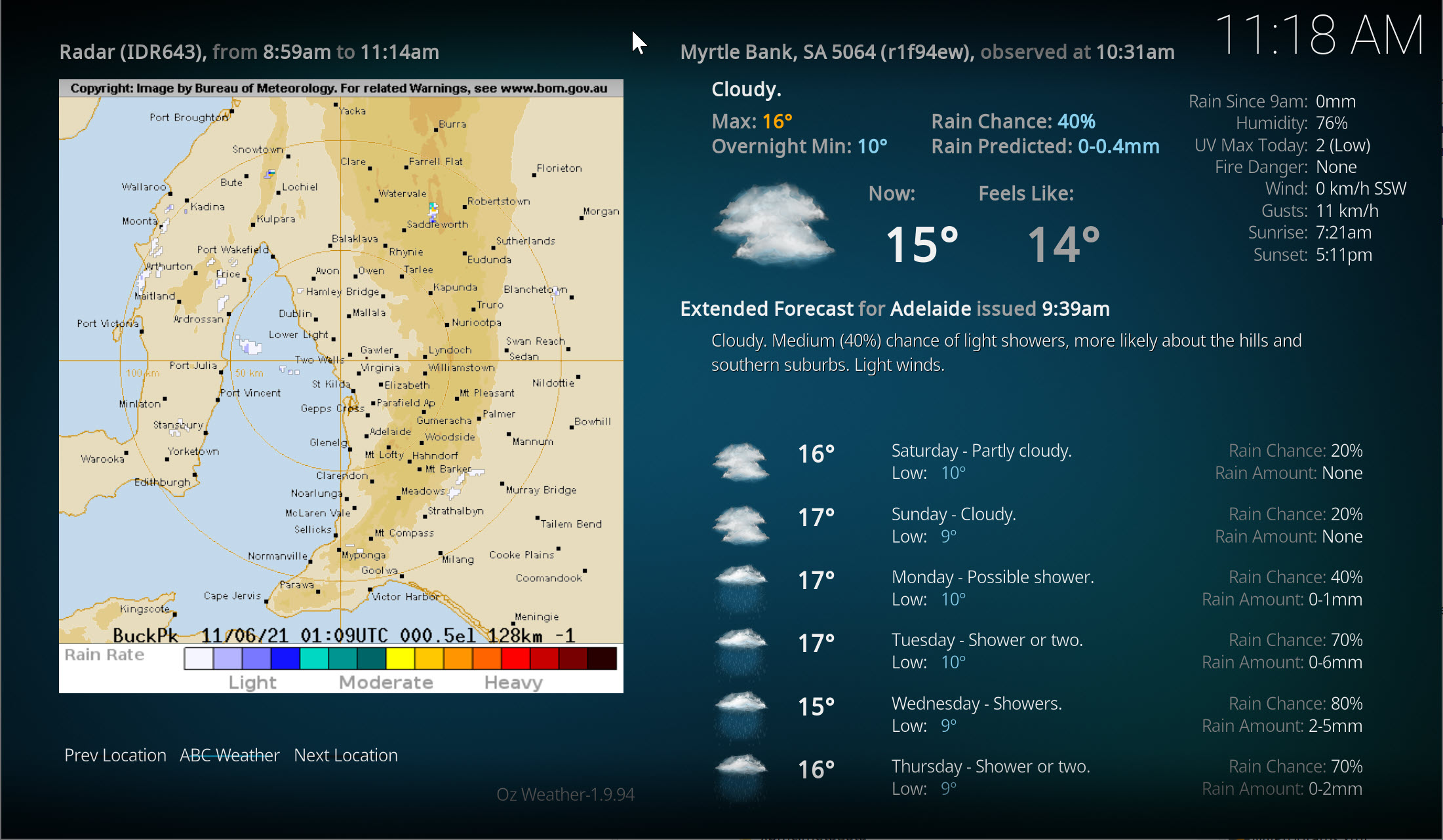 OzWeather in Estuary
 -
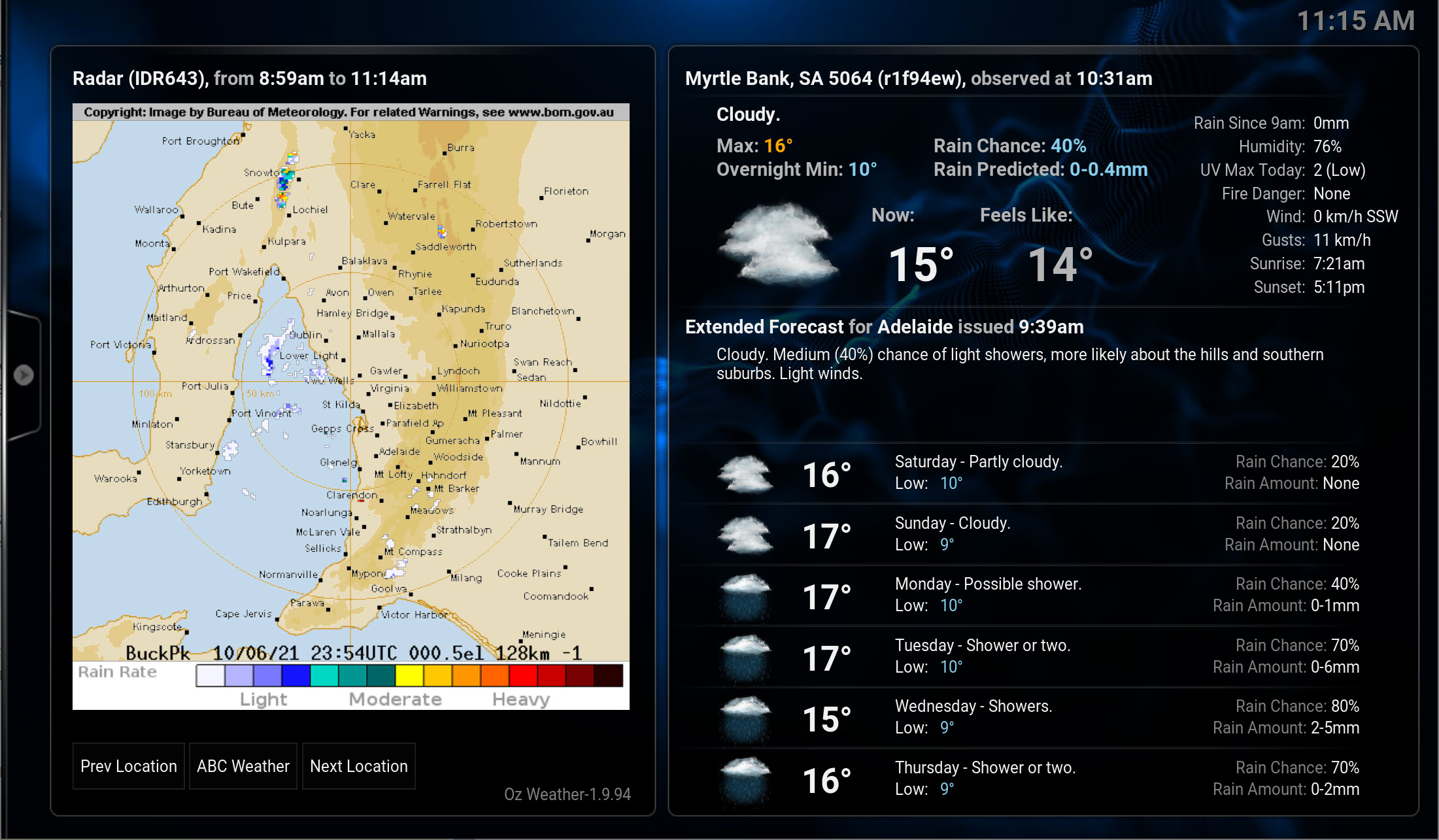 ...in Confluence
 -
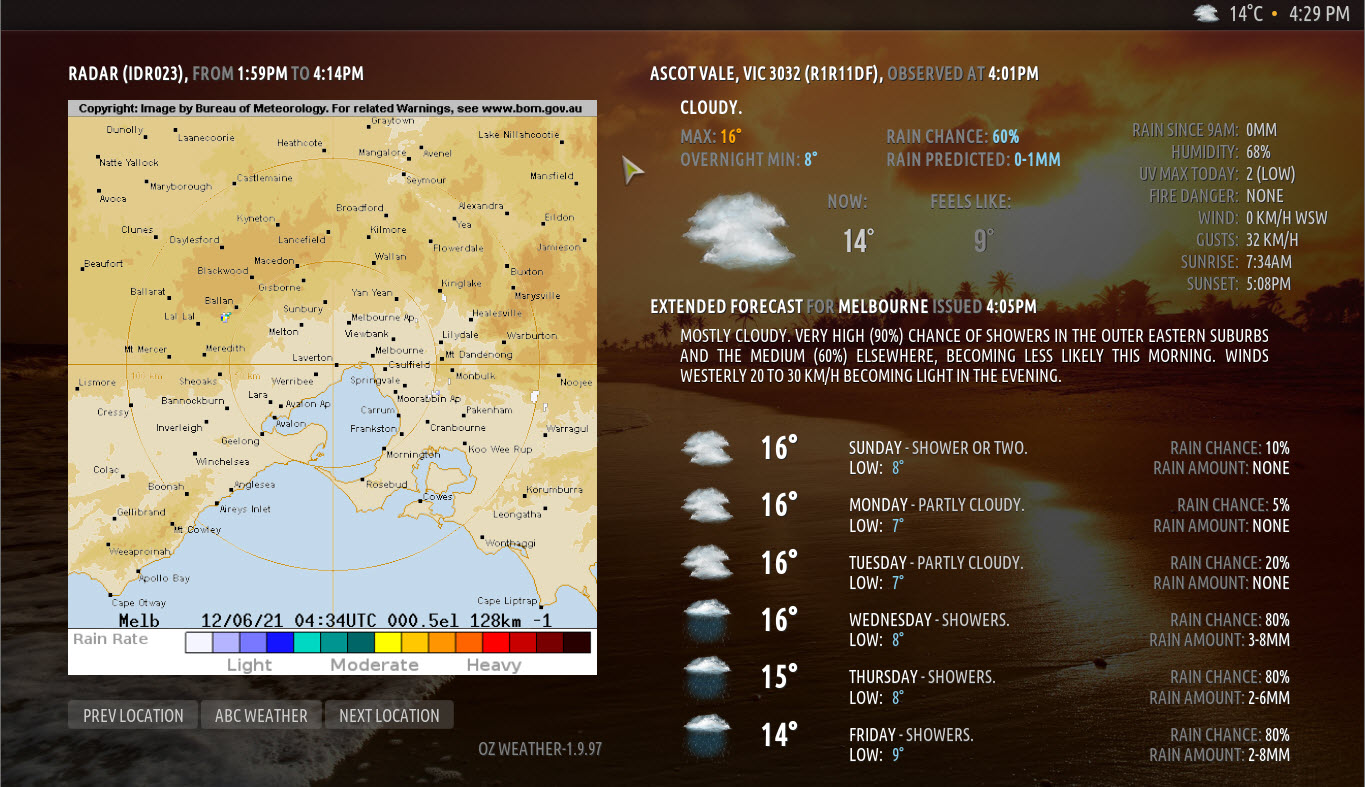 ...in Amber


...you get the idea... (all of these are using the SkinPatcher mentioned below to easily & automatically customise the Weather section).
Instructions
Go into Get More Add-Ons and choose Weather -> OzWeather... (Oz Weather is in the official Kodi repository). For radar support, see notes below on skin changes and a tool to help with this.
NB Troubleshooting: if you experience errors running OzWeather, particularly if using profiles other than the default Master profile, please check in Settings->System->Addons->Manage Dependencies and make sure that the Bossanova808 dependencies, pytz, requests and urllib3 modules are all enabled!
To Configure - First, go to Kodi settings->Weather and choose the OzWeather add on as your selected weather information add on.
In the addon settings you can add up to six BOM locations - you can enter either your postcode or suburb & OzWeather will prompt you to choose from a list of matching locations.
If you enable the extended features (see skin changes required below!) - you can also have animated radars. When you add a new location, OzWeather auto-selects the closest radar to it - but you can overrule this if you wish by manually putting in any BOM radar code.
To manually get a radar code:
The easiest way is to click on a desired point on this BOM MAP. Then click the range you like the best (in the Radar line, e.g. 128 or 256km) - then you will see the code in the resulting url - e.g.
IDR023
(N.B. you need to use the code verbatim as it appears in the URL, including the 'IDR' and the correct number of preceeding 0s!).
Another way to manually find a radar code is to use the search/filter field about half way down this page to the right, and enter a radar location - you can use this map to find the radar locations.
There is also a more formal PDF document about this.
Important: not all codes actually work all the time, as some radars are only in part time use. The main capital city ones work reliably, e.g. IDR023 above which is the Melbourne 128km loop, or try IDR00004 for a nice national radar. OzWeather wants the radar to be there, so if you're experiencing reliability issues, try another radar.
Notes: If ever you experience issues with missing radar background images, wait a day or two, then use the 'purge backgrounds on next refresh' option in the add-on 'Troubleshooting' settings. With luck your backgrounds will be re-downloaded successfully on the next weather retrieval run.
Skin Changes
If you enable the extended forecasts & radar, skin changes are required to see this content.
Utility to Patch Skins
If you're on Kodi Matrix and above, and you're using one of these skins:
- Estuary (& Plextuary)
- Estouchy
- Amber
- Aeon Nox Silvo
- Aeon Tajo
- OSMC Skin
- Confluence
- Confluence Zeitgeist
- Xonfluence
- (Other similar derivatives of Estuary/Aeon/Confluence or whatever may also work...)
...I have written a utility tool to make this MUCH easier. It can automatically patch the skin for you and (as of October '25) - will even do so automatically every time a new skin OR OzWeather update comes along (you can turn off this auto-patching, if you wish, of course).
Note that your skin folder MUST be writeable by the skin patcher addon for this to work (for the Core/Libre-ELEC editions of Kodi, see below, and if you're on some Android platforms, you _may_ need a rooted device - nothing I can do about this, sorry!).
I am in theory happy to add support for other skins (and especially if you can develop & supply working skin files for the current Kodi version!) - just let me know what skin support you're after in the OzWeather forum thread.
The Kodi team will not allow an addon that modifies skin file in to their main repository, understandably. Thus, to install the skin patcher utility - you will first need to install my repository.
Download the latest .zip for that here: https://github.com/bossanova808/repository.bossanova808/tree/master/repository-downloads/repository.bossanova808 (n.b. make sure to use the actual download button, not the 'Raw' button!)
Install that using 'install from zip' in the Kodi addons area, and then install the 'OzWeather Skin Patcher' add-on from that repository. Then, you just run it. It can both patch and restore your skin files as needed. After the initial patch, it will detect future skin/OzWeather updates, and automatically re-patch if needed.
With Confluence and Estuary you get the added bonus of some weather info during playback when you show the video info. With Confluence either the Info (i) or Menu (m) will bring it up, with Estuary just the Menu (m). It looks roughly like this:
-
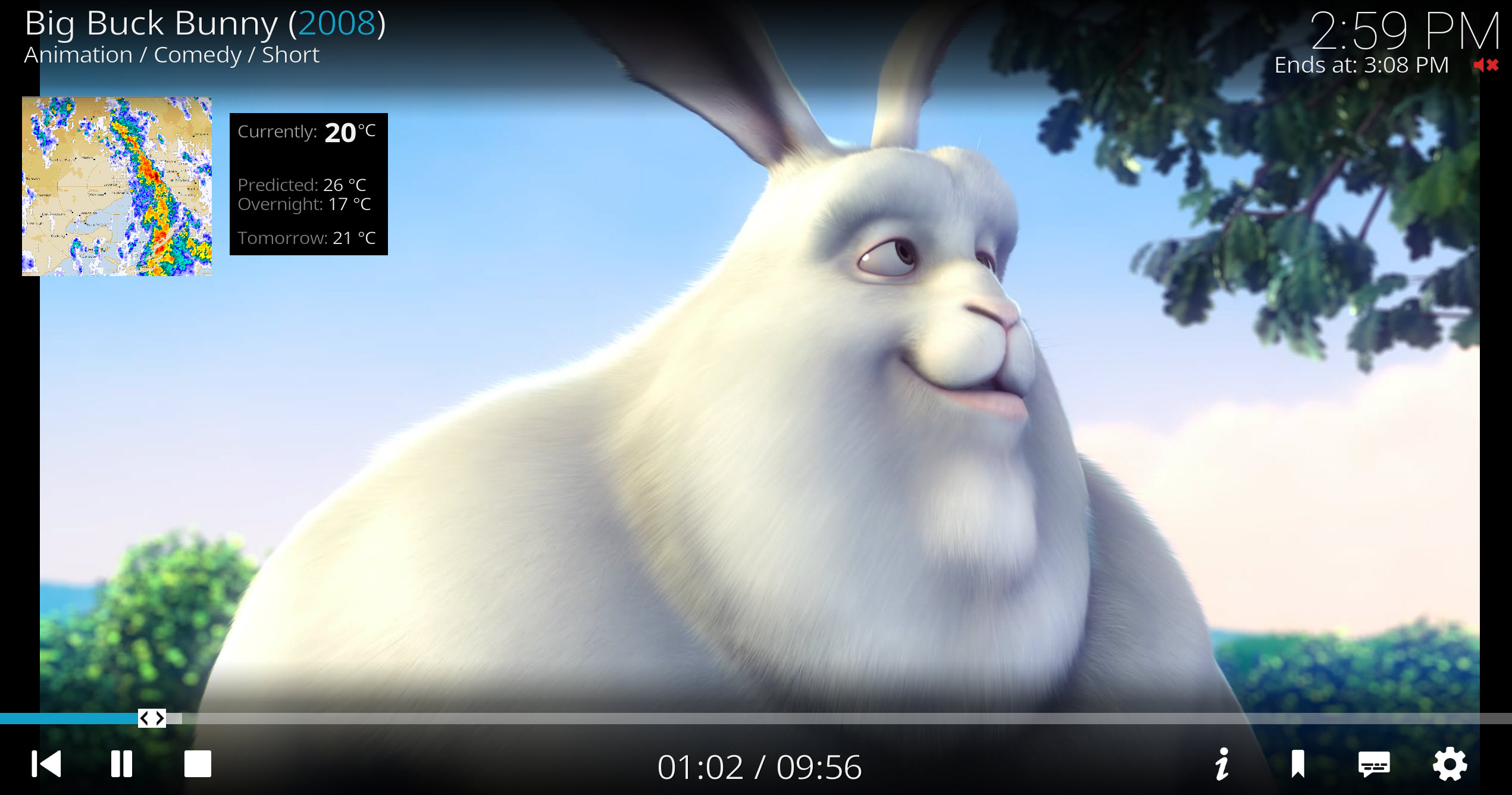 Now Playing Radar Support

Using Corelec / LibreElec with Estuary?
In the case of the -ELEC editions of Kodi, unfortunately the main skin folder is not writeable. This is unfortunately just part of how the -ELEC versions of Kodi are set up. Here are your options:
- Don't use Estuary! Use one of the other supported skins (as, let's face it, Estuary is a low point for Kodi default skins anyway, so you're really not missing much...)
- Or - create your own version of Estuary. Copy the whole estuary folder into your (writeable) add-ons folder, modifying the addon id in addon.xml to give your version a unique name (e.g. skin.estuary-mymod). To then keep your special version of the skin up to date, create a script and set it up to run by cron (or alternatively add these commands to your autostart.sh if you're using one of those) - with the following content (changing the folder name to whatever you've named your personal skin of course):
            #!/bin/sh
            rsync -a --exclude 'addon.xml' --exclude 'MyWeather.xml' --exclude 'VideoFullScreen.xml' /usr/share/kodi/addons/skin.estuary/ /storage/.kodi/addons/skin.estuary-mymod/
            /usr/bin/python /usr/bin/kodi-send -a ReloadSkin
The Manual Approach
Otherwise, if you're some sort of masochist, you can take a manual approach to patching your skin files , using these instructions/files...note that there are updates to these files in the skin patcher add on so use that if at all possible.
You just need to copy some files into your skin/720p or skin/xml folder. Note this *will* break compatibility with other weather add ons, so best to back up the original files first if you're worried about this. Also, you'll have to do some manual search and replacing in the skin files, as the skin patcher uses a 'template tags' system to let folks change text and background colours. You'll need to manually do the equivalent of this python code:
           new_data = new_data.replace('_colour_text_default_', ADDON.getSetting('colour_text_default'))
           new_data = new_data.replace('_colour_text_dim_', ADDON.getSetting('colour_text_dim'))
           new_data = new_data.replace('_colour_text_dimmer_', ADDON.getSetting('colour_text_dimmer'))
           new_data = new_data.replace('_colour_text_high_temp_', ADDON.getSetting('colour_text_high_temp'))
           new_data = new_data.replace('_colour_text_low_temp_', ADDON.getSetting('colour_text_low_temp'))
           new_data = new_data.replace('_background_visible_', 'yes' if ADDON.getSettingBool('background_visible_bool') else 'no')
           new_data = new_data.replace('_background_opacity_', ADDON.getSetting('background_opacity'))
(Another approach, perhaps, would be to run the skin patcher once, then grab the skin files it has generated with your preferred colours, and save those off somewhere for your later purposes...but of course you won't benefit from any future updates to those skin files...)
The latest version of the skin files can be found at: https://github.com/bossanova808/repository.bossanova808/tree/master/staging/script.ozweather-skinpatcher/resources/skin-files
...but for 99% of folks, the skin patcher add on above is the much easier alternative - so try that first!
Support & Troubleshooting
I've been supporting this add on for 15+ years now. I use it myself, of course, and I keep it working as smoothly as the upstream sources allow me to.
If things don't work as expected and you need to ask for help - always supply a link to a FULL DEBUG LOG so I have some real chance of helping you. I will check it and help, if you supply it. But log snippets, or logs without debug logging enable, are NOT enough.
If you're having problems running the add on (and especially if you use Kodi profiles) - make sure that Bossanova808 dependencies, pytz, requests and urllib3 modules are ALL enabled, for the profile you're using specifically. (System -> Addons -> Manage Dependencies...).
If using a manual radar code, do check your radar code carefully - is it _exactly_ as the BOM one - i.e. IDR023 or similar. You must include the IDR part, and the right nu,ber of preceding 0s if there are any! Does the URL in the debug log load if you paste it in to your browser?
Any issues, please post them on the Kodi forum thread.